
Over time, your friend's list will fill up with many deactivated profiles on Facebook. These are accounts that were either set up temporarily or permanently by users who disabled them and never deleted them. While they are not active, they continue to show on your friend's list and only serve to clutter it. Cleaning up the deactivated profiles will keep your list relevant and tidy.
In this tutorial, we are going to show you how you can reveal and remove deactivated profiles from your list of friends on Facebook.
How to Remove Deactivated Profiles?
Below are the steps for removing deactivated profiles from facebook.
Step 1: Facebook Log-In
- Open the web application of Facebook in your browser or open the mobile application.
- Ensure you are logged in to the account.
Step 2: Unlock Your Friends List
- On your homepage, tap or click on the profile icon or name in the top-left corner of the web or on the top right of the mobile app.
- Click Friends below your profile photo to go to the “Friends” tab.
Step 3: Identify Inactive Profiles
- Scroll down your list to find the accounts that say “Facebook User” with no profile picture. Those are deactivated profiles.
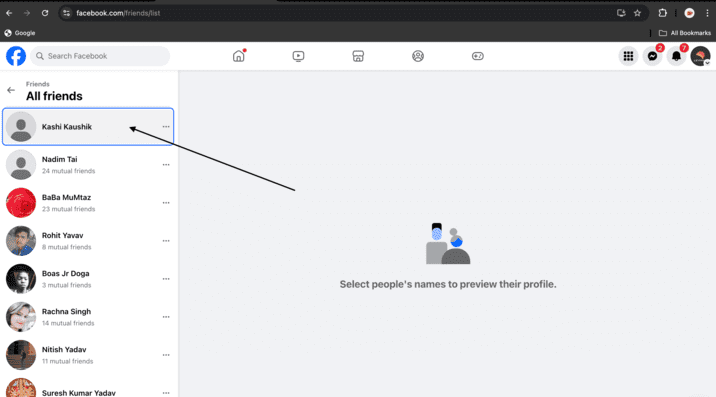
Step 4: Remove the Disabled Profile
Whenever any profile is deactivated
- Online: Click the triple dots ( "..." ), which appear where it says “Facebook User.”
- On mobile: Tap the three dots beside the profile.
- Select Unfriend from the pull-down menu.

Step 5: Confirm Your Action
- Clicking this will bring up a confirmation window asking if you’re sure you want to remove this friend.
- Click Confirmer to remove the deactivated account from your list of friends.
- Check if the account is unfriended or not.
Step 6: Repeat if Necessary
- If you have a list, then go once again through it and repeat the whole process for every profile that has been deactivated.
Conclusion
You can deactivate idle profiles cluttering your list of friends on Facebook with these few simple steps. It will keep your list updated, helping you maintain privacy and keeping your social connections going.