
Are you facing a Booting Error in Windows? Sometimes, your computer won't boot, and this can be really frustrating. Windows 10 boot-up issues are common, but they can be fixed. In this article, we'll show you how to fix Windows 10 Boot issues in 7 quick ways. You don't need to be a tech expert to follow these steps.
We'll cover everything from using Windows 10 startup repair to fix MBR in Windows 10. If your computer is stuck and won't start, our tips will help you fix the Windows 10 boot record and get your system running again. Let's get started and solve these boot issues in Windows 10 together!
Methods to fix Windows 10 Boot Issues
- Method 1: Fix Windows 10 Boot Issues Using Startup Repair
- Method 2: Fix Windows 10 Boot Issues Using Master Boot Repair
- Method 3: Fix Windows 10 Boot Issues By Checking Disk Health
- Method 4: Fix Windows 10 Boot Issues By Repairing Corrupted Files
- Method 5: Fix Windows 10 Boot Issues By Running Virus Scan
- Method 6: Troubleshoot Windows 10 Boot Issues By Replacing Windows Bootloader
- Method 7: Troubleshoot Windows 10 Boot Issues By Factory Reset
7 Quick Ways to Fix Windows 10 Boot Issues
To Resolve Boot Issues on Windows 10, the following guidelines should be executed in the very sequence that we have discussed. Let us start with executing Startup Repair on Windows.
Method 1: Fix Windows 10 Boot Issues Using Startup Repair
To fix Windows 10 Boot up issues using Startup Repair, follow the given 3 easy steps one by one -
Step 1: If you face the Boot Problem on Windows, instead of the staring screen, you will get the following screen. In that case, go for the Troubleshoot option.
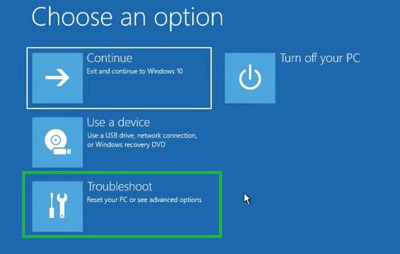
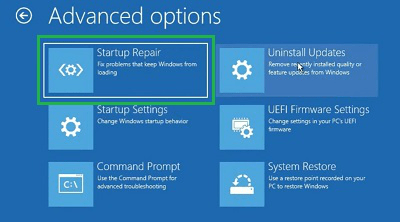
Step 2: Click on the Advanced Options.

Step 3: Click on Startup Repair to let the Windows OS address the issue by itself.
Method 2: Fix Windows 10 Boot Issues Using Master Boot Repair
follow the given steps to troubleshoot Windows 10 Boot issues with the help of MBR (Master Boot Repair) -
Step 1: We have to click on the Troubleshoot option & later go for the Advanced Options.
Step 2: Click on the Command Prompt option to open CMD.

Step 3: Execute the following command. It will help to fix any error related to Windows Boot. If you get the successful message, the work is done.
Command: bootrec /fixmbr

Method 3: Fix Windows 10 Boot Issues By Checking Disk Health
It is one of the quick way to fix Booting issues in Windows 10, follow the given steps carefully to avoid any kind of trouble.
Step 1: Search for the Command Prompt in the Search Bar. And open Command Prompt in the normal way.
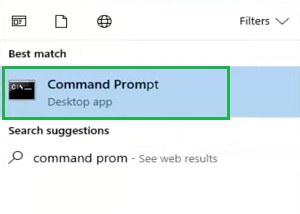
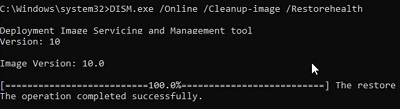
Step 2: Execute the following command in the Command Prompt of Windows. It will check the Disk Health & resolve any issues that were the reason behind the boot error.
Command: dism /online /cleanup-image /restorehealth
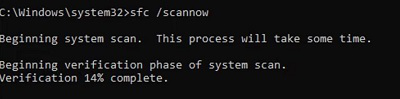
Method 4: Fix Windows 10 Boot Issues By Repairing Corrupted Files
Step 1: Again, search for the Command Prompt & open the CMD Window.
Step 2: Execute the following command. The Command will check the presence of the corrupted files in the drives & resolve them quickly.
Command: sfc/ scannow
Method 5: Fix Windows 10 Boot Issues By Running Virus Scan
Step 1: Open Windows Settings & go to the Update & Security option.
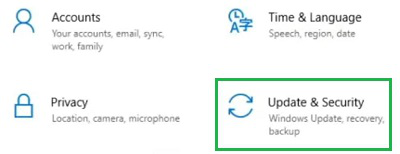
Step 2: Click on the Virus & Threat Protection option.

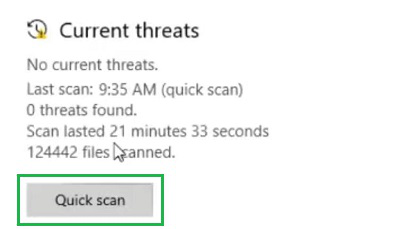
Step 3: Click on the Quick Scan button to find & remove the virus from the device.
Method 6: Troubleshoot Windows 10 Boot Issues By Replacing Windows Bootloader
Step 1: Open the Command Prompt by Searching on the Search Bar.
Step 2: Execute the following command. It will make the changes in the Bootloader Drive. It will help to make a swift booting of the Windows.
Command: bootsect /nt60 sys

Method 7: Troubleshoot Windows 10 Boot Issues By Factory Reset
Step 1: Open Settings & move to the Update & Security option.
Step 2: Under Recovery, go to the Reset This PC option. Click on the Get Started.
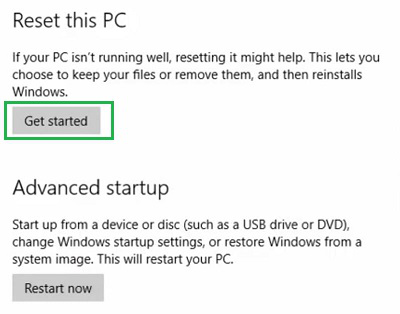
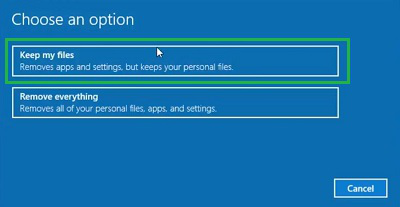
Step 3: Click on the Keep My Files option & let start the entire process.
So from the above discussion, it might become clear How to Troubleshoot Windows 10 Boot Issues. If you are facing any problem while Booting Windows 10 OS, you should follow these methods one by one in the sequence that is being discussed. If the problem persists, then it is time to call one technician.
Conclusion
In Conclusion, Dealing with boot issues in Windows 10 can be frustrating, but with the right steps, you can fix them quickly. From using Windows 10 startup repair to tackling more complex problems like fixing the MBR in Windows 10, there are several methods you can try. If your computer won't boot or your laptop won't start, don't Panic. The steps in this article can help you resolve booting issues in Windows 10. By following these tips, you can fix the Windows 10 boot record and get your computer back to normal.