
From the beginning, Windows offered multiple editions like Starter, Home Basic, Home Premium, Professional, and Ultimate. However, recent versions, including Windows 11, have simplified editions to help users choose the right one. Whether you are buying a new PC or upgrading from Windows 10, this guide will help you decide between Windows 11 Home and Windows 11 Pro.
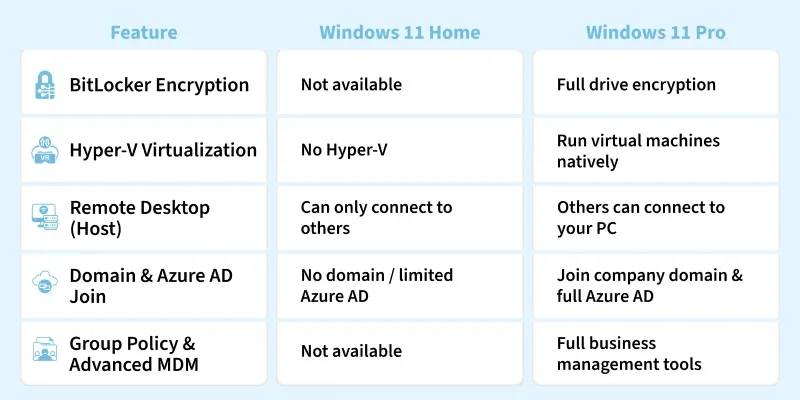
Windows 11 Home Overview
Windows 11 Home is designed for personal and family use, offering all core features expected in a modern operating system.
Key Features
- Redesigned Start Menu and Taskbar
- Snap Layouts for window management
- Widgets panel with news, weather, and finance
- Advanced graphics for gaming (Auto HDR, DirectStorage)
- Access to Android apps via Microsoft Store and Amazon Appstore
- Windows Hello, device encryption, and native passkey support
- Focus sessions, Clipchamp video editor, and improved Voice Typing
Ideal for: Casual users, students, and gamers who need a streamlined OS for everyday tasks and gaming.
Windows 11 Pro Overview
Windows 11 Pro includes all Home features, plus additional tools for business and professional use.
Key Additional Features
- BitLocker Device Encryption for enhanced security
- Windows Information Protection to prevent data leaks
- Group Policy Management for system control
- Remote Desktop (client + host) for remote access
- Hyper-V for running virtual machines
- Domain and Azure Active Directory Join for corporate networks
- Windows Sandbox for safe app testing
- Windows Update for Business for controlled updates
Ideal for: Professionals, IT admins, and businesses requiring advanced security, management, and virtualization features.
Feature Comparison of Windows 11 Home and Windows 11 Pro
For detailed comparison between the key features of Windows 11 Home and Windows 11 Pro, just scrol down. But if you want an overview of features of both of the editions we have created a table that outlines the primary functionalities of each edition.
| Feature | Windows 11 Home | Windows 11 Pro |
|---|---|---|
| Target Users | Consumers and personal use | Business users and professionals |
| Device Encryption | Yes | Yes |
| BitLocker Device Encryption | No | Yes |
| Windows Information Protection | No | Yes |
| Mobile Device Management | Limited support | Full support |
| Group Policy Management | No | Yes |
| Enterprise State Roaming | No | Yes |
| Assigned Access | No | Yes |
| Dynamic Provisioning | No | Yes |
| Windows Hello | Yes | Yes |
| Hyper-V | No | Yes (Requires hardware support) |
| Remote Desktop | Client only | Both client and host |
| Virtual Desktops | Limited customization | More customization options |
| Microsoft Store for Business | No | Yes |
| Domain Join | No | Yes |
| Azure Active Directory Join | Single sign-on to select apps | Full join capabilities |
| Update for Business | No | Yes |
| Windows Sandbox | No | Yes |
| Kernel Mode Virtualization | Based on device capabilities | Based on device capabilities and additional features |
Security Advantages of Windows 11 Pro
- BitLocker: Protects your device and data in case of loss or theft
- Windows Information Protection: Prevents accidental data leaks
- Group Policy Management: Centralized control for multiple users
- Windows Defender Application Guard: Secures against risky websites
- Enterprise Data Protection: Protects sensitive company data

Virtualization
- Windows Sandbox: Run a temporary, isolated Windows environment
- Hyper-V: Create and run multiple virtual machines for testing or development
Business Features
- Enterprise Mode Internet Explorer: Run legacy web apps
- Assigned Access: Restrict users to a single app (useful for kiosks)
- Remote Desktop: Access your PC from anywhere
- Windows Update for Business: Control update timing and deployment
Hardware and Performance
- Both editions share the same minimum requirements.
- Maximum RAM: Home – 128GB | Pro – 2TB
- CPU Sockets: Home – 1 | Pro – 2
- CPU Cores: Home – 64 | Pro – 128
Windows 11 Pro is more suitable for high-end workstations and enterprise setups.
Price Comparison
- Windows 11 Home: $139
- Windows 11 Pro: $199
The price difference reflects Pro’s advanced security, management, and virtualization features.
Common Features in Both Editions
- Copilot generative AI for research and content creation
- Snap Layouts and File Explorer tabs
- Widgets panel and Focus sessions
- Updated Voice Typing and Media Player
- Gaming enhancements: Auto HDR, DirectStorage, improved Game Mode
- Bluetooth quick pairing and Clipchamp video editor
- Powerful screenshot and backup tools
Features You Only Get in Windows 11 Pro
Here are the Advantages of getting Windows 11 Pro:
- Bit Locker Encryption: Provides advanced disk encryption to secure data.
- Group Policy Editor: Allows centralized management of system settings for enterprise users.
- Remote Desktop: Enables remote access to your PC from another device.
- Assigned Access: Restricts a user to a single app for kiosk-like setups.
- Enterprise Mode Internet Explorer: Compatibility for legacy web apps using Internet Explorer.
- Windows Update for Business: Gives more control over update timing and deployment.
- Hyper-V Virtualization: Allows running virtual machines on your system.
- Azure Active Directory (AD) Support: Connects to organizational Azure AD accounts for more secure logins.
- Domain Join: Join corporate networks for access to company resources.
- Windows Sandbox: A secure, isolated environment to test apps and websites.
- Active Directory Support: Integrates with traditional on-premise Active Directory networks.
Which Edition Should You Choose
| Use Case | Recommended Edition |
|---|---|
| Casual users, students, gamers | Windows 11 Home: lightweight, easy, supports gaming & daily tasks |
| Business professionals, IT admins, developers | Windows 11 Pro: advanced security, virtualization, remote management, enterprise tools |