
The binary to Decimal Converter is used to convert binary values to decimal values. GeeksforGeeks provides a binary to decimal converter for easy conversion of the values.
Steps to Convert Binary to Decimal
You just have to follow the steps below to convert binary numbers to their decimal equivalent.
Step 1: Write the binary number and count the powers of 2 from right to left (starting from 0).
Step 2: Write each binary digit(right to left) with corresponding powers of 2 from right to left, such that the MSB or the first binary digit will be multiplied by the greatest power of 2.
Step 3: Add all the products from step 2
Step 4: The answer is our decimal number.
This can be better explained using the examples below.
Binary System
Binary System is a system of writing numbers using only two numbers that are, 0 and 1. The base of the binary number is 2. This system was first used by ancient Indian, Chinese, and Egyptian people for various purposes. The binary number system is used in electronic and computer programming.
Decimal System
The Decimal Numbers System is the number system that is used by us in our daily lives. The base of Decimal numbers is 10, and it uses 10 digits that are 0, 1, 2, 3, 4, 5, 6, 7, 8, and 9.
Binary to Decimal Formula
To convert a binary number to decimal we need to perform a multiplication operation on each digit of a binary number from right to left with powers of 2 starting from 0 and add each result to get the decimalnumber of it.
Decimal Number = nth bit × 2n-1
Binary to Decimal Formula :
n = bnq + bn-1qn-2 +.........+ b2q2 +b1q1 +b0q0 + b-1q-1 + b-2q-2
Where,
- N is Decimal Equivalent
- b is the Digit
- q is the Base Value
Binary to Decimal Conversion
Binary to Decimal conversion is achieved using the two steps that are,
- Positional Notation Method
- Doubling Method
Now let's learn about them in detail.
Method 1: Using Positions
Binary to Decimal Conversion can be achieved using the example added below.
Example 1:Let's consider a binary number 1111. We need to convert this binary number to a decimal number.
As mentioned in the above paragraph while converting from binary to decimal we need to consider each digit in binary number from right to left.
By this way, we can do binary to decimal conversion.

Note: We represent any binary number with this format (xxxx)2 and decimal in (xxxx)10 format.
Example 2: Convert (101010)2 = (?)10

Note: We keep on increasing the power of 2 as long as number of digits in binary number increases.
Example 3: Convert (11100)2 = (?)10
Resultant Decimal number = 0+0+4+8+16 = 28
So (11100)2 = (28)10

Also Check,
Method 2: Doubling Method
To explain this method we will consider an example and try to solve that stepwise.
Example 1: Convert Binary number (10001)2 to decimal.
Similar to the above approach, In this approach also consider each digit but from left to right and performs step-wise computations on it.
1 0 0 0 1 Step-1 First we need to multiply 0 with 2 and add the 1st digit in binary number.
0 x 2 + 1 = 0 + 1 = 1
Step-2 Now use the result of above step and multiply with 2 and add the second digit of binary number.
1
0
0
0
1
1 x 2 + 0 = 2 + 0 = 2
The same step 2 is repeated until there will be no digit left. The final result will be the resultant decimal number.
1
0
0
0
1
2 x 2 + 0 = 4 + 0 = 4
1
0
0
0
1
4 x 2 + 0 = 8 + 0 = 8
1
0
0
0
1
8 x 2 + 1 = 16 + 1 = 17
So we performed step 2 on all remaining numbers and finally, we left with result 17 which is a decimal number for the given binary number.
So (10001)2 = (17)10
Example 2: Convert (111)2 to decimal using doubling approach.
1
1
1
0 x 2 + 1 = 0 + 1 = 1
1
1
1
1 x 2 + 1 = 2 + 1 = 3
1
1
1
3 x 2 + 1 = 6 + 1 = 7
The final result is 7 which is a Decimal number for 111 binary numeral system. So (111)2 = (7)10
These are the 2 approaches that can be used or applied to convert binary to decimal.
Conversion Table :-
How to Read a Binary Number?
Binary numbers are read by separating them into separate digits. Each digit in binary is represented using 0 and 1 and they are the powers of 2 starting from left hand side and then the power is gradually increased from 0 to (n-1).
Binary to Decimal Conversion Table
The given binary to decimal conversion table will help you to convert binary to decimal.
Read More,
Binary(10101101)=(?)10
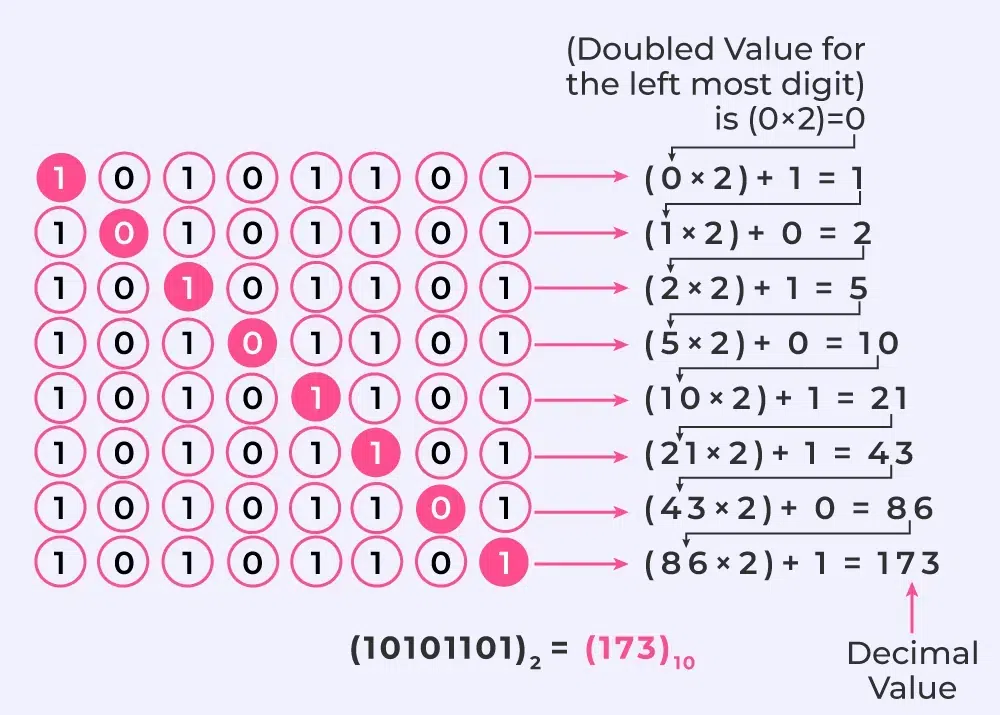
Convert Binary to Decimal (bn to dec)
Q1: Convert (11000)2 to Decimal.
Q2: Convert (10111)2 to Decimal.
Q3: Convert (111110000)2 to Decimal.
Q4: Convert (00011)2 to Decimal.
Q5: Convert (110011)2 to Decimal.
Also Check,