
Resemble AI is like a superpower for creating voices. It’s an AI tool that can turn written text into speech that sounds like a real person talking. Even cooler, it can clone someone’s voice using just a short audio clip, making it sound like they’re saying anything you type. Whether you’re making videos, audiobooks, or ads, Resemble AI makes it easy to get professional-sounding voices without hiring a pro or spending hours recording.
Features of Resemble AI
Resemble AI is loaded with powerful tools that make creating voices fun and easy. Here’s what it can do for you:
- Voice Cloning: Record just a few minutes of someone’s voice (with their permission), and Resemble AI builds a digital version that sounds almost exactly like them. This is perfect for personalizing content, like making a video narration sound like your own voice without recording every line. It’s a time-saver for creators who want a consistent voice across projects.
- Text-to-Speech: Type any text, and the AI transforms it into speech that sounds like a real person talking. You can pick from a wide range of voices or use your cloned voice for a custom touch. It’s great for creating quick voiceovers for videos, audiobooks, or even virtual assistants with minimal effort.
- Multilingual Magic: Need your voice to speak Spanish, French, or one of over 140 languages? Resemble AI can make it happen while keeping the tone and style consistent across languages. This is a game-changer for reaching global audiences, like making ads or social media content that connects with people worldwide.
- Emotion Control: Adjust your voice to sound happy, sad, excited, or anything in between to match your project’s mood. Whether it’s a cheerful ad or a dramatic game character, you can fine-tune the emotion to make it feel authentic. This feature helps your content stand out and connect emotionally with listeners.
- Deepfake Detection: Worried about fake voices being misused? Resemble AI’s “Resemble Detect” tool analyzes audio to tell if it’s real or AI-generated, keeping things safe and ethical. This is especially useful for businesses or creators who want to ensure trust and authenticity in their projects.
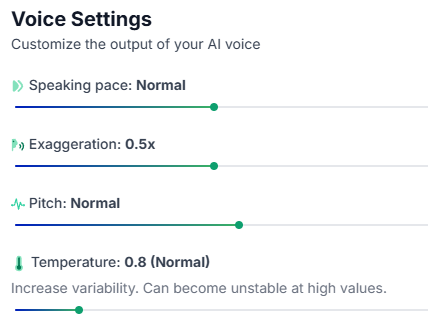
- Easy Editing: Tweak the pitch, speed, or emphasis of your audio to get the perfect sound, no fancy equipment needed. The user-friendly editor lets you play with settings to match your vision, like making a podcast intro sound bold or soothing. It’s like having a pro audio studio right on your computer.
- API for Developers: If you’re tech-savvy, Resemble AI’s API lets you integrate voices into your apps, games, or websites seamlessly. This means you can add dynamic voice features, like a talking chatbot or game character, without complex coding. It’s a powerful tool for building interactive experiences.
What Can Resemble AI Do the Best?
Resemble AI shines at creating ultra-realistic voices that feel human. Its voice cloning is top-notch—just a few minutes of audio can produce a voice that’s nearly identical to the original. The ability to add emotions like joy or suspense makes it perfect for engaging content like videos or games. Plus, its multilingual support (over 140 languages!) makes it a dream for creators targeting global audiences. Whether you’re narrating a documentary or building a virtual assistant, Resemble AI delivers studio-quality audio in minutes.
How Social Media Content Creators Are Advancing by Leveraging Resemble AI
Social media creators are all about standing out, and Resemble AI is their secret weapon. YouTubers use it to create smooth voiceovers for intros or narrations without recording every line themselves. TikTok creators can clone their voice to keep their brand consistent across videos, even in multiple languages to reach global fans. Podcasters save hours by generating intros or ads in their own voice, no studio required.
For example, a travel vlogger can clone their voice to narrate videos in Spanish for their Latin American audience, making content feel personal and professional. This saves time, cuts costs, and lets creators focus on making awesome content.
How to Use Resemble AI
Getting started with Resemble AI is super simple. Here’s how you can create your own AI voice:
Step 1: Sign Up
- Head to resemble.ai and create an account. You can try some features for free without a credit card.

Step 2: Choose Your Service
- Decide if you want text-to-speech (typing text for the AI to say) or voice cloning (copying someone’s voice).

Step 3: Record or Upload Audio
- For voice cloning, record 25 sentences using Resemble’s scripts or upload a clear audio clip (at least 30 seconds, no background noise).


Step 4: Customize Your Voice
- Adjust the tone, speed, or emotion (like happy or serious) to fit your project.
Step 5: Generate and Preview
- Type your text, hit generate, and listen to the result. Tweak it if needed.
Step 6: Download or Integrate
- Save your audio as a WAV or MP3 file, or use the API to add it to your app or website.
Pro tip: Use a good microphone for recordings to get the best results!
Use Cases Resemble AI
Resemble AI is a game-changer for GEMINI: AI HoroScope for Today for all sorts of projects. Here are a few ideas with prompts to try:
- Podcast Intro: Create a catchy opening for your podcast.
Prompt: “Hi, welcome to GFG Podcast! Today, we’re diving into E-Learning with a fun, energetic vibe.”
- Game Character Voice: Add personality to a video game character.
Prompt: “I’m the fearless hero of this realm, ready to battle with a bold, confident tone.”
- Multilingual Ad: Reach a global audience with a cloned voice.
Prompt: “Discover our amazing product, now available worldwide, spoken in Spanish with excitement.”
- Audiobook Narration: Turn a book chapter into audio.
Prompt: “In a world of mystery, she uncovered secrets, narrated in a calm, storytelling voice.”
Where Resemble AI Lacks and Tips to Avoid Issues
No tool is perfect, and Resemble AI has a few limitations:
- Paid Plans: There’s no free version, though a trial lets you test some features. Plans start at $29/month (Creator plan), which might be steep for casual users.
Tip: Try the free trial to test it out, and check the pay-as-you-go Personal plan for occasional use.
- Clear Audio Needed: Voice cloning works best with high-quality, noise-free recordings.
Tip: Record in a quiet space with a good microphone (like a USB mic) for crisp results.
- Learning Curve: The editor’s controls (pitch, tone) can feel tricky at first.
Tip: Watch Resemble AI’s tutorial videos on their website to get the hang of it quickly.
- Ethical Concerns: Cloning voices raises privacy or misuse worries.
Tip: Always get permission to clone a voice, and use Resemble’s deepfake detection tools to stay safe.
Best Practices for Best Outputs
To get the best from Resemble AI, your prompts matter. A vague prompt might lead to flat or off-tone audio, while a detailed one brings it to life. Here’s an example:
- Bad Prompt: “Say this text: Welcome to my channel.”
Result: Sounds robotic, lacking personality. - Good Prompt: “Say ‘Welcome to my channel!’ in a warm, enthusiastic tone, like you’re greeting an old friend.”
Result: Feels lively and engaging. Always include tone, emotion, or context in your prompt, and preview the audio to tweak it until it’s perfect.