
Microsoft 365 Copilot
Contains adsIn-app purchases
4.6star
8.49M reviews
1B+
Downloads

Teen
info




About this app
The Microsoft 365 Copilot app is your AI-first productivity app for work and home. It provides one place for you to chat with your AI assistant1, create and edit content, scan documents, manage projects, and quickly find files on the go - helping you get more done, without doing more.
With the Microsoft 365 Copilot app, you can[1]:
• Chat with your AI assistant – Ask Copilot to summarize a document saved to the cloud (OneDrive or SharePoint) or on your phone, draft an email, or analyze a spreadsheet using natural language.
• Interact with voice – Talk to Copilot to help you prepare for your day, get answers, and brainstorm ideas hands-free.
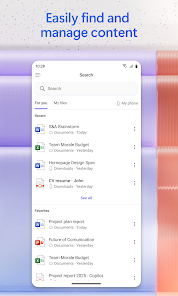
• Find what matters fast – Find the strategy deck you were working on a month ago, a picture from your last family reunion, or a file that was attached to an email.
• Accelerate your learning – Ask Copilot to explain a concept, summarize recent trends, or help you prepare for a presentation.
• Get expert insights – Use built-in AI agents like Researcher and Analyst to generate research reports and analyze complex datasets.
• Create polished content – Create and edit images, posters, banners, videos, surveys and more with easy-to-use templates.
• Scan files – Scan documents, photos, notes and more with your mobile app.
• Manage projects easily - Bring together ideas, documents, and links and ask Copilot to summarize and connect the dots with Copilot Notebooks.
• Easily upload and save documents – Upload Word, Excel, or PDF files from your phone’s storage to get answers from Copilot — plus, save Copilot-created files directly to your phone.
The Microsoft 365 Copilot app helps you find and edit files, scan documents, and create content on the go with access to Word, Excel, PowerPoint, and PDFs all in one app
Sign in with your work, school, or personal Microsoft account to start using the free app today.
[1] Availability of Microsoft 365 Copilot features may vary. Some capabilities require specific licenses or may be disabled by your organization's administrator. See this webpage for more information on feature availability by license.
Please refer to Microsoft’s EULA for Terms of Service for Microsoft 365. By installing the app, you agree to these terms and conditions: https://learn.microsoft.com/en-us/legal/microsoft-365/microsoft-365-copilot-mobile-license-terms
With the Microsoft 365 Copilot app, you can[1]:
• Chat with your AI assistant – Ask Copilot to summarize a document saved to the cloud (OneDrive or SharePoint) or on your phone, draft an email, or analyze a spreadsheet using natural language.
• Interact with voice – Talk to Copilot to help you prepare for your day, get answers, and brainstorm ideas hands-free.
• Find what matters fast – Find the strategy deck you were working on a month ago, a picture from your last family reunion, or a file that was attached to an email.
• Accelerate your learning – Ask Copilot to explain a concept, summarize recent trends, or help you prepare for a presentation.
• Get expert insights – Use built-in AI agents like Researcher and Analyst to generate research reports and analyze complex datasets.
• Create polished content – Create and edit images, posters, banners, videos, surveys and more with easy-to-use templates.
• Scan files – Scan documents, photos, notes and more with your mobile app.
• Manage projects easily - Bring together ideas, documents, and links and ask Copilot to summarize and connect the dots with Copilot Notebooks.
• Easily upload and save documents – Upload Word, Excel, or PDF files from your phone’s storage to get answers from Copilot — plus, save Copilot-created files directly to your phone.
The Microsoft 365 Copilot app helps you find and edit files, scan documents, and create content on the go with access to Word, Excel, PowerPoint, and PDFs all in one app
Sign in with your work, school, or personal Microsoft account to start using the free app today.
[1] Availability of Microsoft 365 Copilot features may vary. Some capabilities require specific licenses or may be disabled by your organization's administrator. See this webpage for more information on feature availability by license.
Please refer to Microsoft’s EULA for Terms of Service for Microsoft 365. By installing the app, you agree to these terms and conditions: https://learn.microsoft.com/en-us/legal/microsoft-365/microsoft-365-copilot-mobile-license-terms
Updated on
Events & offers

Safety starts with understanding how developers collect and share your data. Data privacy and security practices may vary based on your use, region, and age. The developer provided this information and may update it over time.


Ratings and reviews
4.6
8.05M reviews

Kya Roberts
- Flag inappropriate
- Show review history
November 1, 2025
I downloaded this and within a week, despite me not using it more than once, somehow someone gained access to my account. What a coincidence! Oh, and Microsoft was nice enough to wait 6 hours before notifying me off the compromise, as shown by the recent activity. And what's up with it taking up to 24h to logout of all devices for my security?! Thanks to this app, I may be getting rid of every Microsoft service going forward.
39 people found this review helpful

Anantesh Mohapatra
- Flag inappropriate
October 9, 2025
I need this app to open MS365 files on my phone. If I wanted Copilot, I would have installed the separate Copilot app. Instead, the whole app has been transformed to be Copilot, and the actual documents have been hidden away under Search – which you wouldn't expect. I've been using OneDrive to actually access my documents, but still rely on this to edit those files. Just put Copilot into a button, and let us use 365/Office properly again!
323 people found this review helpful

James Tucker
- Flag inappropriate
September 18, 2025
Pure, unadulterated, rubbish! Ever since the "Co pilot" update i can't find anything, I can't navigate, if I ask the stupid ai a question about the app, where to find my files(there's no indication on the opening page) or anything else it comes up with no answer or gibberish!? I liked 365 when it was a useful interface for getting things done. Now it's just a wasted icon on my phone, soon to be deleted and my subscription canceled.
100 people found this review helpful
What’s new
Thank you for using Office.
We regularly release updates to the app, which include great new features, as well as improvements for speed and reliability.
We regularly release updates to the app, which include great new features, as well as improvements for speed and reliability.
App support
About the developer
Microsoft Corporation
1 Microsoft Way
Redmond, WA 98052
United States
+1 800-642-7676


