Tailwind CSS Border Radius
Last Updated :
23 Jul, 2025
This class accepts more than one value in tailwind CSS. All the properties are covered as in class form. It is the alternative to the CSS border-radius property. This class is used to set the border-radius.
Border Radius Classes:
- rounded-none
- rounded-sm
- rounded
- rounded-md
- rounded-lg
- rounded-xl
- rounded-2xl
- rounded-3xl
- rounded-full
- rounded-t-none
- rounded-r-none
- rounded-b-none
- rounded-l-none
- rounded-t-sm
- rounded-r-sm
- rounded-b-sm
- rounded-l-sm
- rounded-t
- rounded-r
- rounded-b
- rounded-l
- rounded-t-md
- rounded-r-md
- rounded-b-md
- rounded-l-md
- rounded-t-lg
- rounded-r-lg
- rounded-b-lg
- rounded-l-lg
- rounded-t-xl
- rounded-r-xl
- rounded-b-xl
- rounded-l-xl
- rounded-t-2xl
- rounded-r-2xl
- rounded-b-2xl
- rounded-l-2xl
- rounded-t-3xl
- rounded-r-3xl
- rounded-b-3xl
- rounded-l-3xl
- rounded-t-full
- rounded-r-full
- rounded-b-full
- rounded-l-full
- rounded-tl-none
- rounded-tr-none
- rounded-br-none
- rounded-bl-none
- rounded-tl-sm
- rounded-tr-sm
- rounded-br-sm
- rounded-bl-sm
- rounded-tl
- rounded-tr
- rounded-br
- rounded-bl
- rounded-tl-md
- rounded-tr-md
- rounded-br-md
- rounded-bl-md
- rounded-tl-lg
- rounded-tr-lg
- rounded-br-lg
- rounded-bl-lg
- rounded-tl-xl
- rounded-tr-xl
- rounded-br-xl
- rounded-bl-xl
- rounded-tl-2xl
- rounded-tr-2xl
- rounded-br-2xl
- rounded-bl-2xl
- rounded-tl-3xl
- rounded-tr-3xl
- rounded-br-3xl
- rounded-bl-3xl
- rounded-tl-full
- rounded-tr-full
- rounded-br-full
- rounded-bl-full
Rounded corners: In this section, classes are covered that have been used to create rounded corners like rounded-sm, rounded-md, rounded-lg, etc, but not the fully circular or the pill shapes.
Syntax:
<element class="rounded-{Border-Radius}">...</element>
Example:
HTML
<!DOCTYPE html>
<html>

<head>
    <link href=
"https://unpkg.com/[email protected]/dist/tailwind.min.css"
        rel="stylesheet">
</head>

<body class="text-center">
    <h1 class="text-green-600 text-5xl font-bold">
        GeeksforGeeks
    </h1>

    <b>Tailwind CSS Border Radius Class</b>

    <div class="mx-4 grid grid-cols-3 gap-2 bg-green-200 p-2">

        <!-- First sub div is not for roundig-->
        <div class="rounded-none bg-green-400 w-48 h-12">
            rounded-none</div>
        <div class="rounded bg-green-400 w-48 h-12">
            rounded</div>
        <div class="rounded-sm bg-green-400 w-48 h-12">
            rounded-sm</div>
        <div class="rounded-md bg-green-400 w-48 h-12">
            rounded-md</div>
        <div class="rounded-lg bg-green-400 w-48 h-12">
            rounded-lg</div>
        <div class="rounded-xl bg-green-400 w-48 h-12">
            rounded-xl</div>
    </div>
</body>

</html>
Output:

Pills and circles: In this section, classes are covered that have been used to create full-circle and pills like rounded-full class.
Syntax:
<element class="rounded-full">...</element>
Example:
HTML
<!DOCTYPE html>
<html>

<head>
    <link href=
"https://unpkg.com/[email protected]/dist/tailwind.min.css"
        rel="stylesheet">
</head>

<body class="text-center">
    <h1 class="text-green-600 text-5xl font-bold">
        GeeksforGeeks
    </h1>

    <b>Tailwind CSS Border Radius Class</b>

    <div class="mx-24 grid grid-cols-3 gap-2 bg-green-200 p-2">
        <div class="rounded-full bg-green-400 py-3 px-6">
            rounded-full for Design Pill
        </div>
        <div class="rounded-full mx-32 bg-green-400 h-24 w-24
                flex items-center justify-center">
            rounded-full for Circle
        </div>
    </div>
</body>

</html>
Output:

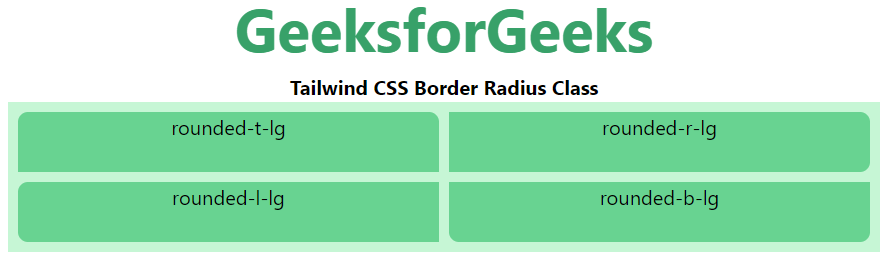
Rounding sides separately: In this section, all the classes are covered which has been used to create one side rounded like rounded-t-lg, rounded-r-lg, rounded-b-lg, etc.
Syntax:
<element class="rounded-{t|r|b|l}{-size?}">...</element>
Example:
HTML
<!DOCTYPE html>
<html>

<head>
    <link href=
"https://unpkg.com/[email protected]/dist/tailwind.min.css"
        rel="stylesheet">
</head>

<body class="text-center">
    <h1 class="text-green-600 text-5xl font-bold">
        GeeksforGeeks
    </h1>

    <b>Tailwind CSS Border Radius Class</b>

    <div class="mx-4 grid grid-cols-2 gap-2 bg-green-200 p-2">

        <!-- First sub div is not for roundig-->
        <div class="rounded-t-lg bg-green-400 w-full h-12">
            rounded-t-lg</div>
        <div class="rounded-r-lg bg-green-400 w-full h-12">
            rounded-r-lg</div>
        <div class="rounded-l-lg bg-green-400 w-full h-12">
            rounded-l-lg</div>
        <div class="rounded-b-lg bg-green-400 w-full h-12">
            rounded-b-lg</div>
    </div>
</body>

</html>
Output:
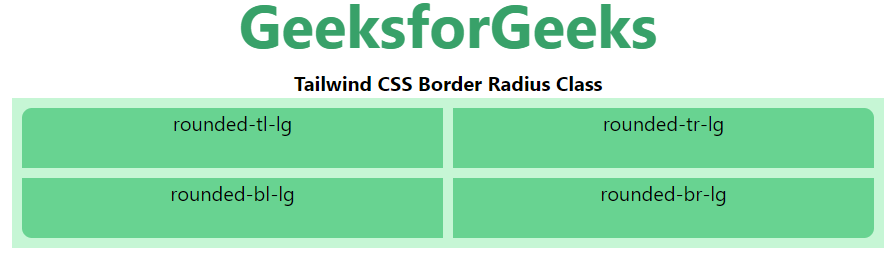
Rounding corners separately: In this section, all the classes are covered which has been used to create one corner rounded like rounded-tl-lg, rounded-tr-lg, rounded-br-lg, etc.
Syntax:
<element class="rounded-{tl|tr|br|bl}{-size?}">...</element>
Example:
HTML
<!DOCTYPE html>
<html>

<head>
    <link href=
"https://unpkg.com/[email protected]/dist/tailwind.min.css"
        rel="stylesheet">
</head>

<body class="text-center">
    <h1 class="text-green-600 text-5xl font-bold">
        GeeksforGeeks
    </h1>

    <b>Tailwind CSS Border Radius Class</b>

    <div class="mx-4 grid grid-cols-2 gap-2 bg-green-200 p-2">

        <!-- First sub div is not for roundig-->
        <div class="rounded-tl-lg bg-green-400 w-full h-12">
            rounded-tl-lg</div>
        <div class="rounded-tr-lg bg-green-400 w-full h-12">
            rounded-tr-lg</div>
        <div class="rounded-bl-lg bg-green-400 w-full h-12">
            rounded-bl-lg</div>
        <div class="rounded-br-lg bg-green-400 w-full h-12">
            rounded-br-lg</div>
    </div>
</body>

</html>
Output: