AWS Security Hub is an Open Security Hub Service page that collects the data from the various AWS services and identifies security issues and provides us a comprehensive view of all the issues with cause and remediation.
It helps us to keep our AWS services and applications deployed on AWS more secure and follow industry-standard security practices. In this article, firstly we will discuss what is aws security hub and then why do we use this and how to setup the security hub in different methods and its features, benefits and use cases much more...
What is AWS Security Hub?
AWS Security Hub is a security service in aws that used to centralize and update the security checks across the AWS accounts. It provides a unified view of security alerts and compliance status integrating with various AWS services. It helps in organizing minimum maintenance of security posture with ensuring compliance with industry standards.
Why Do We Need AWS Security Hub?
Security Hub provides us with a lot of things easy, below are the primary things:
- Automated Security Checks: It will help us to automate the security checks across the account, it will analyze our entities in an account and provide us a comprehensive view of security issues, and their remediations.
- Consolidated view: The security hub provides us with a consolidated view of the findings, through which we can prioritize and address those issues.
- Automate Remediation of Findings: The security hub provides us the possibility to integrate with event bridge so that, we can automate remediations, or we can even use this feature to send the details to some kind of ticket management system, or just for notifying about the specific issue. To know the difference between Security group and NACL refer to the Amazon Web Services – Security Group vs NACL.
Understanding and utilizing tools like AWS Security Hub is crucial for maintaining robust security practices. For those looking to enhance their skills in AWS security and overall DevOps, our comprehensive DevOps course provides in-depth coverage of AWS Services, including Security Hub. The course offers practical knowledge on automated security checks, consolidating security findings, and automating remediation processes.
A Step-By-Step Guide To SetUp Security Hub
You can set up a security hub for your account using three methods as follows. We discussed about all these 3 methods step by step effectively.
- AWS CLI
- AWS Web Console
- AWS Multi-Account Setup (Script)
Method 1: AWS Console
To set up a security hub for your account using AWS Console, you can follow the below steps. To know how to create an AWS account refer to Amazon Web Services (AWS) – Free Tier Account Set up.
- Login to AWS Account
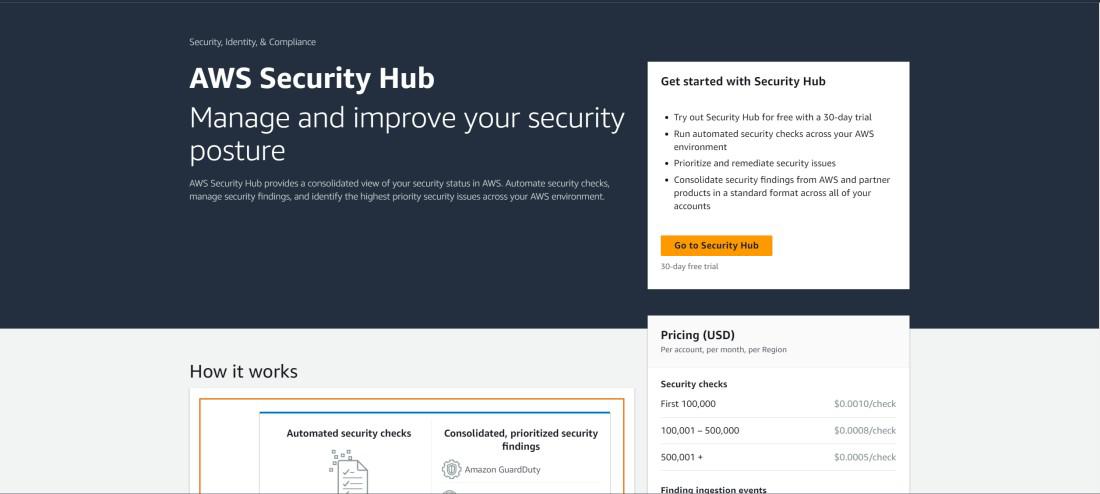
- Open the Security Hub Service page.
- Go to Security Hub
- Choose Security Standards
- Enable Security Hub
Step 1: Open the Security Hub Service page.
- After opening the security hub home page, click on "Go to Security Hub"
Step 2: Configure Security Hub Options.
- Choose Security standards based on which security checks will be performed, and then click on "Enable Security Hub"
.jpg)
Step 3: View Findings.
- After enabling the security hub, it may take some time for Security Hub to collect and analyze data before presenting findings and then you can view issues in the Findings Tab.

Method 2: AWS CLI
- You can use AWS-provided security hub cli API to enable it, run the below command to set up the security hub with default standards.
aws securityhub enable-security-hub -
-enable-default-standards --tags
'{"enabledBy": "DilLip"}'
- enable-security-hub is a sub command of security hub service cli API, which will grant all the required permission for the security hub service to gather security issues, from various services.
- enable-default-standards will enable the security hub with default security standards.
- tags will add the tags to the created resource.
Method 3: AWS Multi-Account Setup
You can also use the below script provided by AWS Labs to enable a security hub across multiple accounts, follow the below steps to do so.
- Install Python (if not exists already)
sudo apt-get install python3.9 python3.9-pip
- Install boto3 and aws cli (if not installed already")
python3 -m pip install boto3
- Clone the repo. This command clones the AWS Security Hub Multi-Account Scripts from GitHub.
git clone https://github.com/awslabs
/aws-securityhub-multiaccount-scripts.git
- Change the current directory to the script directory
cd aws-securityhub-multiaccount-scripts/multiaccount-enable
- run the script using the below command
python3 enablesecurityhub.py --master_account <Account Id>--assume_role
 <Service role name> input_file
- master_account: the account ID of the management account from which you will manage all the account's security findings.
- assume_role: The role name with which the management account and the accounts mentioned in input_file will assume and call the required APIs by assuming this role.
- The role must be created in all accounts, including the management account, with the policy and trusted policy shown below.
Role Policy
{
    "Version": "2012-10-17",
    "Statement": [
        {
            "Condition": {
                "StringLike": {
                    "iam:AWSServiceName": [
                        "securityhub.amazonaws.com",
                        "config.amazonaws.com"
                    ]
                }
            },
            "Action": "iam:CreateServiceLinkedRole",
            "Resource": "*",
            "Effect": "Allow"
        },
        {
            "Action": "securityhub:*",
            "Resource": "*",
            "Effect": "Allow"
        },
        {
            "Action": [
                "config:DescribeConfigurationRecorders",
                "config:DescribeDeliveryChannels",
                "config:DescribeConfigurationRecorderStatus",
                "config:DeleteConfigurationRecorder",
                "config:DeleteDeliveryChannel",
                "config:PutConfigurationRecorder",
                "config:PutDeliveryChannel",
                "config:StartConfigurationRecorder"
            ],
            "Resource": "*",
            "Effect": "Allow"
        },
        {
            "Action": "iam:PassRole",
            "Resource": "arn:aws:iam::*:role/aws-service-role/config.amazonaws.
            com/AWSServiceRoleForConfig",
            "Effect": "Allow"
        },
        {
            "Action": [
                "s3:CreateBucket",
                "s3:PutBucketPolicy",
                "s3:ListBucket"
            ],
            "Resource": "arn:aws:s3:::config-bucket-*",
            "Effect": "Allow"
        }
    ]
}
Trusted Policy
{
  "Version": "2012-10-17T00:00:00.000Z",
  "Statement": [
    {
      "Effect": "Allow",
      "Principal": {
        "AWS": "<MasterAccountId>"
      },
      "Action": [
        "sts:AssumeRole"
      ]
    }
  ]
}- input_file: The CSV file path, which contains the list of accounts details with Account Id, email Address format
You can automate all the above things using the cloud formation script in EnableSecurityHub.yaml file.After configuring the required things and running the script, your accounts will be enabled with a security hub to track security issues and report them in the console dashboard.
Benefits of AWS Security Hub
The following are the benefits of aws security hub:
- Centralized Security Management: It provides a unified dashboard for viewing and managing the security alerts and compliance status across multiple AWS accounts.
- Automated Security Checks: It facilitates with continuously performing the security best practice with checks and compliance assessments. It helps with reducing manual effort and improving efficiency.
- Integration with AWS and Third-Party Tools: It provides a seamlessly integration with various AWS services and third-party security tools with enhancing overall threat detection and response capabilities.
- Enhanced Visibility and Compliance: It offfers detailed insights and detailed reports to help organizations maintain a strong security posture and meet industry compliance standards.
Use Cases of AWS Security Hub
The following are the use cases of AWS Security Hub:
- Centralized Security Management: It enhances and manages the security alerts from multiple AWS accounts and services in one unified dashboard.
- Compliance Monitoring: It is implemented for compliance monitoring such as CIS AWS Foundations Benchmark and PCI DSS can be used to Continuously monitor and assess compliance.
- Automated Security Checks: To find possible weaknesses and incorrect setup execute programmatic, ongoing security scans.
- Integration with Security Tools: We can leverage third-party securities and services offered by AWS like Amazon Guard Duty and AWS Config for better security analytics.
Security Hub And AWS Services Integration
We integrate AWS Security Hub with various AWS Security Services for the management and monitoring of security alert in our system. These are some of the AWS tools AWS Security Hub connects with:
- Amazon Guard Duty: Amazon Guard Duty service gives us continuous threat detection for your AWS accounts, S3 data, and workloads. It helps us to identify and decrease security risks by analyzing event logs and network traffic.
- Amazon Macie: Macie assists you in identifying the presence of Personally Identifiable Information (PII) in your S3 buckets. Further, it categorizes data by its sensitivity, and all its developments are marked with a risk level of high medium or low and also the generation of an alert.
- Amazon Inspector: This tool, enables you to perform automated security checks on the vulnerabilities in your EC2 instances wishing to maintain high levels of security compliance.
- IAM Access Analyzer: This tool, enables you to perform automated security checks on the vulnerabilities in your EC2 instances wishing to maintain high levels of security compliance. IAM Access Analyzer: This service will review the policies associated with your AWS resources – S3 buckets, KMS keys, Lambda, Lambda functions, and IAM roles – to check if any of them provide access from outside AWS.
- Amazon CloudWatch and CloudWatch Events: These services work with Security Hub to log security metrics, and generate alerts. It also has to be mentioned that AWS Lambda can be used for automation of the response on security findings.
- AWS Firewall Manager: This service comes as a solution for managing security in many AWS accounts at once, as well as providing centralize control over WAFs and security groups.

AWS Security Hub is also integrated with a number of other third-party solutions also. While there are some native Amazon AWS services, Third Party Tools available through AWS Partner Network (APN) consist of additional security tools. The list of integrated third party tools is available on AWS Security Hub official webpage.
Security Standards & Best Practice Overview
AWS Security Hub can be activated on your AWS account and then you can choose particular security standards for the user provided that they conform to regulation and other standards. It acts as a set of controls that can be used to evaluate compliance in your AWS setting. Currently, there are three key automated checks that you can activate:
1. Foundational for AWS Security Best Practices
This check list is created with the insights from AWS professionals in order to discover where your AWS accounts and utilities are not meeting the security standards. These controls focus on these main AWS services and enhance your organization’s security across the board. AWS Foundational Security Best Practices are a comprehensive set of security best practices with the AWS basic services that is updated often.

2. AWS Security Hub CIS Benchmark
The Center for Internet Security (CIS) has established security guidelines that are widely recognized across industries. AWS Security Hub provides a benchmark based on these guidelines, automatically checking your environment for compliance with a subset of CIS recommendations. Key checks include:
- Avoiding the use of the root account
- Disabling credentials that haven't been used for 90 days or more
- Enforcing IAM password policies with a minimum length of 14 characters
- Ensuring Multi-Factor Authentication (MFA) is enabled for the root account
- Restricting security group rules to prevent open access on port 22 (SSH) from 0.0.0.0/0
- Enabling key rotation for customer-managed KMS keys
These checks help you ensure your environment aligns with industry-recognized security guidelines.

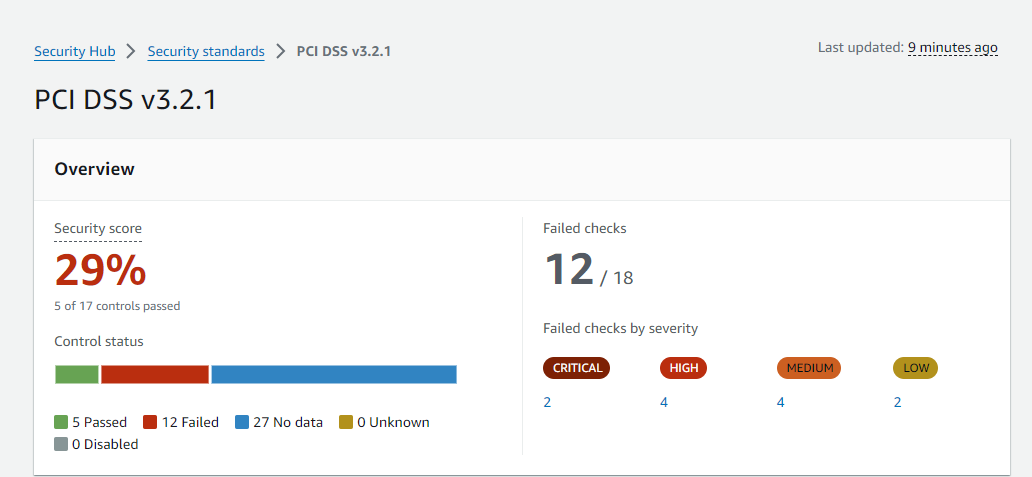
3. Owner Entity requirements which include Payment Card Industry Data Security Standard (PCI DSS)
For organizations that deal with credit cards the Payment Card Industry Data Security Standard (PCI DSS) is crucial. The automated checks of AWS Security Hub comprise the following check to meet the requirement of PCI DSS. These checks are aimed at establishing that credit card details are being dealt with properly, in terms of protecting such information, structure of the networks and authorization.
Security Hub Pricing
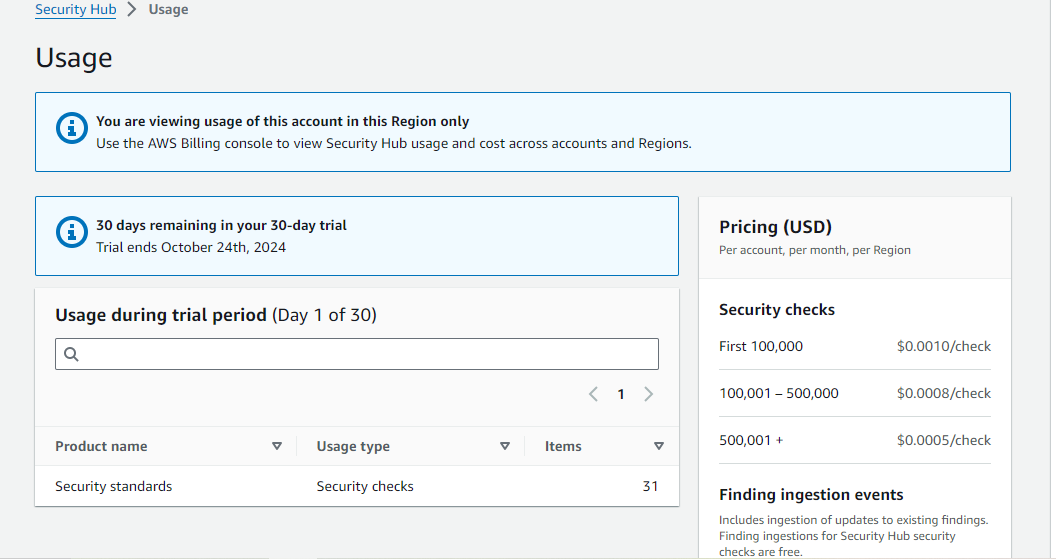
When evaluating the advantages of AWS Security Hub, understanding its costs is essential. Security Hub utilizes AWS Config for its security checks, which is a separate service with its own pricing structure. You’ll need to refer to AWS Config pricing for specific details.
In Security Hub’s settings, you can view usage and cost information, which helps you estimate your monthly charges and identify the services contributing to your bill. AWS also offers a 30-day free trial of Security Hub for each account, allowing you to assess potential costs without upfront commitment.
Features of AWS Security Hub
The following are the key features of AWS Security Hub:
- Centralized Security Management: It improves and prioritizes the security findings from various AWS services and third-party tools in one place.
- Automated Compliance Checks: It facilitate with continuously monitoring and assessing in AWS resources that are against to industry standards and best practices.
- Integrated Threat Intelligence: It provides an actionable information by integrating with AWS partner solutions and AWS's own threat intelligence.
- Customizable Security Insights: It facilitates with allowing the customization of security insights and alerts, helping organizations tailor their security posture to specific needs.
Conclusion
Setting up AWS Security Hub can help you improve your organization's security posture and compliance status. By following the steps outlined above, you can enable Security Hub for your AWS accounts and start using it to identify and address potential security risks.
Explore
DevOps Basics
Version Control
CI & CD
Containerization
Orchestration
Infrastructure as Code (IaC)
Monitoring and Logging
Security in DevOps