How to Delete Pull Request Azure DevOps
Last Updated :
23 Jul, 2025
Sometimes, after making a pull request in Azure DevOps, you might need to eliminate it as it is no longer needed. But Azure DevOps does not let you delete pull requests completely. Instead, you could delete or abandon them so that they don’t stay in your project.
This article will show you easy steps to delete or remove pull requests in Azure DevOps, explain its limitations, and share best practices to avoid mistakes.
Can You Delete a Pull Request in Azure DevOps?
Before starting, it is important to understand that Azure DevOps does not allow you to permanently delete a pull request. However, you can abandon a PR, which removes it from active lists but retains a record in the system.
Key Points to Consider:
- No Permanent Deletion: There is no option to completely erase a PR from history.
- Abandoning a PR: This action closes the PR and removes it from active lists.
- Branch Management: The branch associated with the PR remains unless you delete it manually.
If you need to remove a pull request, follow the steps below.
How to Delete Azure PR from Azure DevOps: Step by Step
The following steps we followed to delete the Azure PR from Azure DevOps:
Step 1: Navigate to the Pull Request
- Go to the repository where the pull request exists.
- Navigate to the "Pull requests" tab, where you can see a list of all open pull requests.
Step 2: Select the Pull Request
- Click on the specific pull request that you want to delete.
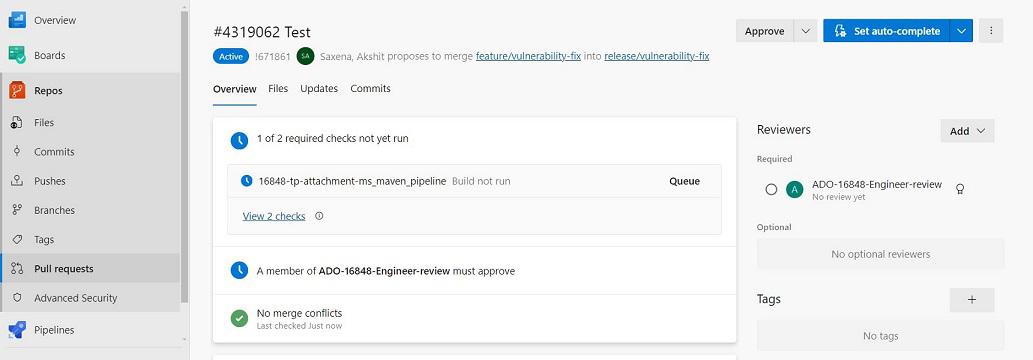
- Look for the options menu (usually represented by three dots or a gear icon) mostly found near the top-right corner of the pull request details page.
Step 4: Choose Abandon
- From the options menu, select "Abandon".

Step 5: Confirm Deletion
- A confirmation dialog may appear asking you to confirm the deletion. Read through the message to ensure you are deleting the correct pull request, and then confirm your action.

Best Practices to Avoid Making Mistakes When Deleting a Azure PR
The following are some best practices which everyone must follow to avoid making mistakes when deleting a Azure PR:
- Verify Pull Request Details: Always double-check the title, description, and associated department of the pull request before deletion to make certain you are concentrated on an appropriate one.
- Review Feedback and Comments: Take time to consider any comments, remarks, or approvals on the pull request. Deleting it in advance could bring about the loss of precious input or discussions.
- Communicate with Your Team: Inform your team contributors before deleting a pull request, specially if it's a collaborative attempt. This transparency helps avoid misunderstandings and ensures anybody is aware about the movement being taken.
- Consider the impact on the Branch: Understand the consequences of deleting the pull request on its related branch. In some cases, deleting a pull request may additionally get rid of the branch containing important paintings.
- Backup Important Information: Prior to deletion, keep in mind saving critical info including giant remarks or branch state someplace else if wanted. This precaution helps hold essential records.
Conclusion
While Azure DevOps does now not support permanent deletion of pull requests, the "Abandon" option lets in you to close PRs and remove them from active tracking. If needed, you can also manually delete the associated branch. If needed, you can also manually delete the related branch. Always double-check details, review comments, and inform your team before abandoning a pull request. This helps avoid mistakes and keeps your project organized.
Explore
DevOps Basics
Version Control
CI & CD
Containerization
Orchestration
Infrastructure as Code (IaC)
Monitoring and Logging
Security in DevOps