Ansible is an IT automation engine that automates various IT tasks like server setup, application deployment, and cloud management. It uses simple, easy-to-read YAML instructions to define tasks and can manage multiple systems at once.
The following are some important features of Ansible:
- No extra software or security setup needed.
- Uses YAML (Yet Another Markup Language) in the form of playbooks, allowing automation tasks to be written in easy-to-read, English-like syntax.
- Works with users, cloud services, and CMDB.
Working of Ansible
Ansible follows a push-based model where the control node pushes configurations to managed nodes.
Basic Workflow:
- Define Inventory: Begin by creating an inventory file that lists all the managed nodes. You can group these nodes logically for easier management, allowing for targeted operations on specific sets of systems.
- Write Playbook: Develop a playbook that outlines the sequence of tasks you want to execute on the managed nodes. Playbooks are written in YAML and define both the order and specifics of operations, utilizing Ansible's modules for various actions.
- Execute Playbook: Once the playbook is ready, execute it from the control node. Ansible connects to each managed node (either via SSH for Linux systems or WinRM for Windows systems), runs the specified tasks, and disconnects automatically once complete.
- Idempotency: One of Ansible's core strengths is its idempotency. Running the same playbook multiple times ensures that the managed nodes maintain the same desired state, preventing accidental or unintended changes with each execution.
Ansible Architecture

The Ansible architecture consists of users who create playbooks (instructions) that tell Ansible (the automation tool) what to do on different hosts (computers or servers). Ansible uses modules to perform tasks, and it connects to the hosts through connection plugins (like SSH). There are plugins to add extra features, and Ansible can even work with machines in the cloud (private or public). This whole system helps you automate boring or repetitive tasks, making your job easier and faster.
Let's discuss about the each components of Ansible Architecture:
1. Users
- The users are system administrators, DevOps engineers, or anyone who needs to automate tasks on servers or cloud resources.
- Users interact with Ansible by writing playbooks and managing inventories. They initiate the automation tasks and decide which machines (hosts) need to be configured or managed.
2. Ansible
- Ansible is the automation tool at the center of this architecture. It is responsible for executing tasks that automate IT operations like installing software, setting up configurations, or deploying applications.
- Ansible doesn't require an agent installed on the remote machines. It uses SSH (or other methods) to communicate directly with the hosts.
3. Host Inventory
- This is a list of all the machines that Ansible will manage. It contains the IP addresses or hostnames of the servers, virtual machines, or cloud instances.
- When you run an automation task (like a playbook), Ansible knows which machines (hosts) to apply the task to because it checks the host inventory. You can also group hosts into categories (for example, all web servers) to target specific machines.
4. Playbooks
A playbook is a YAML file containing a series of tasks to be executed by Ansible. It defines the actions that Ansible will perform on the hosts defined in the inventory.
5. Core Modules and Custom Modules
- Core Modules: These are the default modules that come with Ansible. For example,
apt is used to manage packages on Debian-based systems, and service is used to start/stop services. - Custom Modules: Sometimes, Ansible's built-in modules might not be enough. You can create custom modules to meet specific needs. For example, if you have a unique application or environment, you can write your own module to automate its management.
6. Plugins (Email, Logging, Other)
These are additional modules that can extend Ansible’s functionality. Plugins might include email notifications, logging, or others to customize or enhance the automation process.
7. Connection Plugins
- Connection plugins handle how Ansible connects to the remote machines (hosts).
- The most common connection method is SSH (for Linux machines). This means Ansible will use SSH to remotely execute commands on the hosts.
- For Windows, Ansible uses WinRM (Windows Remote Management) as a connection plugin.
8. Private/Public Cloud
- This indicates that Ansible can interact with both private and public cloud environments to automate the deployment and management of cloud-based infrastructure.
- Private Cloud: Your internal cloud infrastructure (such as OpenStack or VMware).
- Public Cloud: Cloud platforms like Amazon AWS, Microsoft Azure, or Google Cloud
9. Hosts (Host 1, Host 2, Host 3... Host N)
- Hosts are the machines (servers, virtual machines, or containers) that Ansible manages.
- They can be part of your private or public cloud infrastructure or even physical machines.
- You can define a group of hosts (like all web servers or all database servers) and then run tasks on all of them at once.
Use Cases of Ansible
Ansible is a powerful automation tool widely adopted across various industries to streamline IT operations, enhance efficiency, and reduce human error.
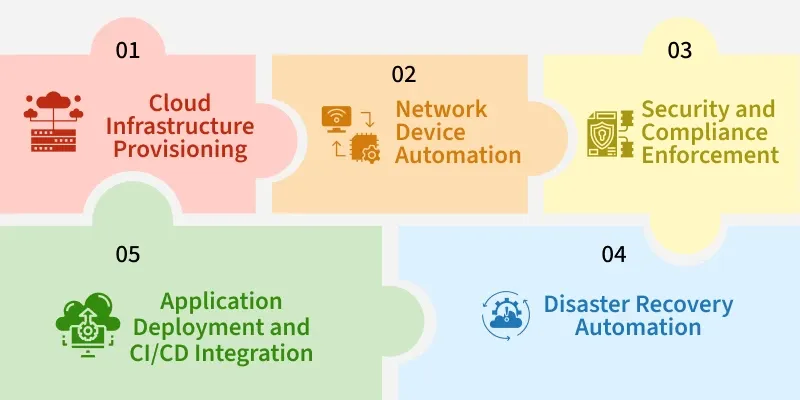
Here are some real-world use cases explaining how organizations uses Ansible:
1. Cloud Infrastructure Provisioning
Organizations utilize Ansible to automate the provisioning of cloud resources across platforms like AWS, Azure, and Google Cloud. For instance, a company can use Ansible playbooks to launch EC2 instances, configure networking, and deploy applications consistently across multiple environments.
2. Network Device Automation
Network engineers employ Ansible to automate the configuration of network devices such as routers, switches, and firewalls. This includes tasks like setting up VLANs, applying security policies, and ensuring compliance with network standards, leading to consistent and error-free network configurations.
3. Security and Compliance Enforcement
Ansible assists in automating security configurations and compliance checks across IT infrastructures. Organizations use Ansible playbooks to enforce security policies, manage user permissions, and apply patches, ensuring systems are secure and compliant with industry standards.
4. Disaster Recovery Automation
In disaster recovery scenarios, Ansible automates the restoration of services by executing predefined playbooks that restore configurations, reinstall software, and reapply settings, minimizing downtime and ensuring business continuity.
5. Application Deployment and CI/CD Integration
Development teams integrate Ansible into their CI/CD pipelines to automate the deployment of applications. Ansible playbooks can automate tasks like pulling the latest code, running tests, and deploying applications to various environments, facilitating continuous integration and delivery.
Ansible Playbook With Example
These are the ordered list of tasks that are saved so you can run those tasks in that order repeatedly. Playbooks are written in YAML and are easy to read, write, share and understand. Ansible playbooks can perform wide variety of tasks as mentioned below
- Deploying and configuring applications
- Managing system configurations
- Orchestrating complex workflows
Example
The language used to write Ansible playbooks is YAML, which is human-readable. The following sections will cover the structure and examples of Ansible playbooks.
---
- hosts: all
  tasks:
    - name: Install the Apache web server
      apt:
        name: apache2
        state: present
Explanation:
- hosts: Defines which machines to target.
- tasks: Lists the steps to execute.
- apt module: Installs the Apache package.
Explore
DevOps Basics
Version Control
CI & CD
Containerization
Orchestration
Infrastructure as Code (IaC)
Monitoring and Logging
Security in DevOps