Microsoft Azure - Retrieve Azure Virtual Machine Admin User Name
Last Updated :
23 Jul, 2025
In this article, you will get to know, how you can find an azure Virtual machine admin user name in crucial situations to recover an azure VM Username. Purpose - this username will help you to reset an azure VM password in the absence of Admin or else if some forget or In case of verifying the username.
Implementation:
Follow the below steps to find Azure VM Admin user name:
Step 1: Log in to Azure Portal.
Step 2: Open Cloud Shell >> select PowerShell.
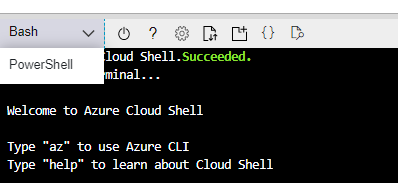
Step 3: Copy the below Azure PowerShell Command and Paste the command in the cloud shell console.
Get-AZVM -Name "Provide_the_Azure_VM_Name_Here" | Select-Object -ExpandProperty OSProfile
For Example:
Get-AZVM -Name "CloudOps-VM1" | Select-Object -ExpandProperty OSProfile
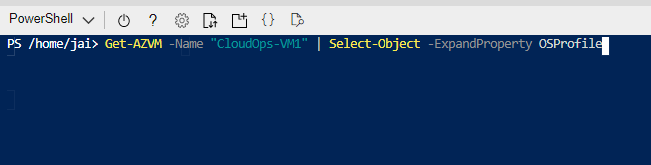
If you want to filter from a specific Resource Group then use the below command
Get-AZVM `
-Name "Provide_the_Azure_VM_Name_Here" `
-ResourceGroup "Provide_Resource_Group_Name_Here" `
| Select-Object -ExpandProperty OSProfile
Output:
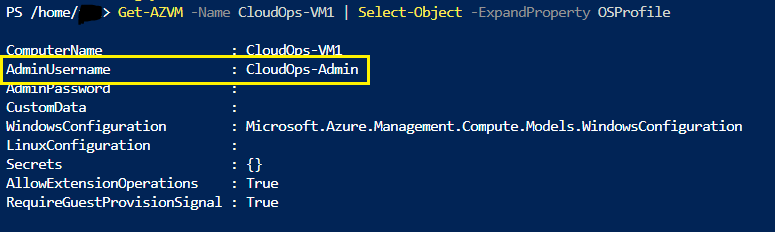
That's it, you are done. This way we can retrieve the user name of an Azure VM administrator.
Explore
DevOps Basics
Version Control
CI & CD
Containerization
Orchestration
Infrastructure as Code (IaC)
Monitoring and Logging
Security in DevOps