Version Control with Azure Repos
Last Updated :
23 Jul, 2025
Azure Repos, part of the Azure DevOps suite, is a robust version control service enabling teams to manage their codebase, collaborate on projects, and maintain a secure, centralized repository for software development. This article explores the key features and benefits of Azure Repos, including creating and managing repositories, working with branches, handling merge conflicts, and integrating with other Azure services. Whether you're new to version control or an experienced developer, this guide offers a comprehensive understanding of how Azure Repos can enhance your development workflows.
1.1. Definition and Importance
Version control systems (VCS) are a term used in the software development industry to describe a class of VCS tools that may show project managers or developers a history of the changes made to source code or files. The reason the VCS is regarded as the cornerstone is that both project managers and developers understand how important it is to retain upwards of many versions of an application. Managing different versions is a necessary necessity. The purpose of VCS is to make these efforts easier to modify. VCS also serves as a tool to help software development teams coordinate their activities when working together to create a project or application. Several VCS branches develop over time, maintaining unique snapshots at various points in time that may diverge or combine.
Repository Servicesstands for the repository, which is the data store that serves as a VCS's backend and stores all source code and configuration artifacts, including configurable artifacts that might not contain source code or software development. In order for the build system to choose the desired source files for the creation of an application from the repository, it frequently includes properties, parameters, environment variables, and scripts. Celebrity support is becoming a crucial component of VCS for project managers, employers, and other stakeholders.
2. Understanding Azure Repos
Features
- Git is a widely used distributed version control system that is supported by Azure Repos. Teams can now effectively manage code repositories, track changes, and work together on code.
- Your code repositories may be hosted on a scalable and secure infrastructure with Azure Repos. Enterprise-grade security capabilities, such as auditing, permissions, and access control, are available.
- Other Azure DevOps services, such as Azure Boards, Azure Pipelines (for CI/CD), and Azure Artifacts are closely linked with Azure Repos. This smooth integration streamlines the process of development and delivery.
- Teams can work on several features or bug fixes at once without affecting the main codebase thanks to Azure Repos' support for advanced Git features like branching and merging.
- Azure Repos facilitates developer cooperation and ensures code quality by enabling developers to manage pull requests and conduct code reviews.
- With the help of the service's comprehensive reporting and analytics features, teams can keep tabs on committed actions, track code changes, and learn more about the development process.
Benefits
- Teams may improve productivity by streamlining their development workflows and decreasing context switching thanks to Azure Repos' integrated nature inside the Azure DevOps environment.
- Azure Repos keeps a comprehensive history of all code modifications, enabling teams to monitor the development of the codebase, pinpoint the contributors, and guarantee responsibility.
- Azure Repos is a cloud-based service, that can expand with your company and yet offer dependable performance and high availability.
- Teams may take advantage of a multitude of tools and capabilities, including project management, continuous integration, and deployment, thanks to the close connection with other Azure DevOps services.
3. Getting Started with Azure Repos
3.1 Creating a New Repository
Step 1 :
Open the DevOps Portal for Azure: Start by going to https://dev.azure.com/, the Azure DevOps interface, and logging in with your company credentials.
Step 2 :
Select the project for which the new repository is to be created. You can start a new project if you don't already have one.
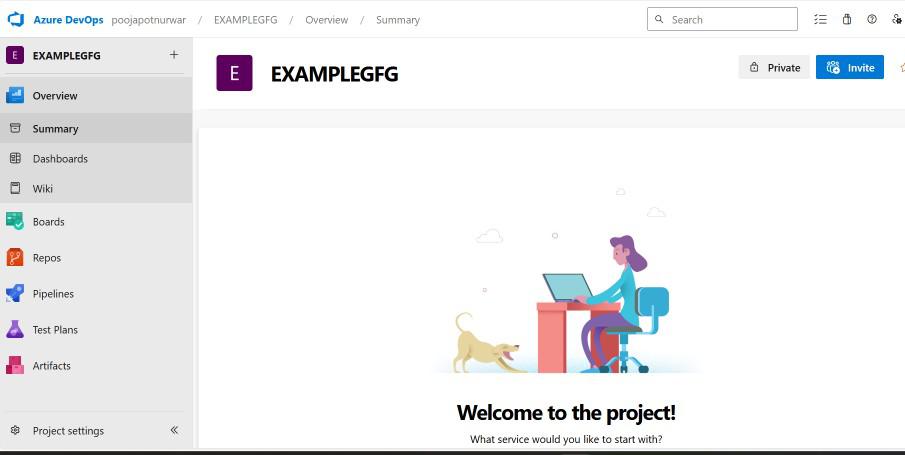
Step 3 :
To access Repos, find and select the "Repos" area from the menu on the left.

Step 4:
On the Repos page, click on the "New repository" button

Step 5:
Configuration of the Repository: To initiate the "Create a new repository" dialog, you must enter the following information:
- Give your repository a name that has some significance.
- Choose "Git" as the kind of repository.
- Verify that the right project is chosen.
- Select the repository's visibility level (public, private, or organization).
Step 6:
Create the Repository To finish creating the repository, check the parameters and then click the "Create" button.
3.2 Cloning of Repository
Step 1:
Find the "Clone" button on the repository page, then copy the URL that appears.

Step 2 :
Launch the Git client: Start the Git client of your choice, such as Git Bash, Git CMD, or an IDE that supports Git like Visual Studio Code.
Step 3:
To clone the repository to your local workstation, use the Git clone command. For instance, you can type the following command into the Git Bash terminal.
git clone <repository_url>
Instead of <repository_url>, enter the URL you copied in the first step.
Step 4:
After the cloning procedure is finished, navigate to the newly created repository folder in your current directory.
4. Branching and Merging in Azure Repos
4.1. Branching Strategies
Centralized Branching Model:
- Developers using the centralized branching model work on the main branch. It's an easy and uncomplicated method.
- Every modification is immediately merged into the primary branch.
Feature Branching Model
- Every new feature or bug correction in this model is created on a separate branch.
- For their work, developers make a new branch, commit their modifications, and subsequently merge the branch back into the main branch.
- This method aids in maintaining a tidy and orderly codebase, isolating changes, and facilitating code reviews.
GitFlow Branching Model
- GitFlow is a widely used branching model that includes branches like "develop", "release", and "hotfix".
- The "develop" branch integrates new features, while the "main" branch holds production-ready code.
- The "release" branch prepares new releases, and the "hotfix" branch addresses urgent bug fixes. .
Trunk-based Development:
- This methodology places emphasis on a single primary branch, which is referred to as the "main" or "trunk" branch.
- Developers routinely commit their modifications while working directly on the main branch.
- The main branch is where feature development is done directly, with minimal branching.
GitHub Flow:
- This model, which emphasizes feature branches, is a lightweight branching approach.
- Every time a feature or problem is fixed, developers make a new branch and then submit a pull request to integrate the changes back into the master branch.
- Teams that value agility and quick iterations will find it ideal
5. Policies and Permissions
- Branch Policies: At least two reviews must be approved before merging a pull request.
- Status Checks: Consider setting up a build and test suite to run automatically for every pull request.
- Permissions: Give developers the ability to establish and manage branches, but restrict who on the team can merge modifications into the main branch.
- Safe Branches: Prior to being merged into the main branch, changes must pass additional inspections and approvals.
- Policies for Conditional Access: For all pull and push requests, multi-factor authentication (MFA) must be used.
Conclusion
Version control solutions that are adaptable are provided by Azure Repos to help your software development process. Depending on the requirements of your project, you can select from a variety of branching models, such as Centralized or Feature Branching. Additionally, Azure Repos offers tools for managing rights and policies. Before merging changes, you can establish prerequisites like review approvals or successful builds. You may manage who is able to create and merge branches with permissions. An additional degree of control is added by security features like conditional access and protected branches. You can utilize Azure Repos to simplify your development process and preserve the integrity of your projects by being aware of these version control features.
What is AZURE Repos ?
Git and team foundation Version Control for software projects are provided by azure repos.
What are the key features of Azure Repos?
Version control, branching and merging, work item tracking, code reviews, and support for the Git and TFVC version control systems are some of the main characteristics of Azure Repos
How can I set up an Azure Repos repository?
Within your Azure DevOps organization, you may establish a new repository, select Git or TFVC.
Can you integrate Azure Repos with other Azure services?
Yes, Azure Repos can be integrated with various other Azure services and including Azure Boards.
Explore
DevOps Basics
Version Control
CI & CD
Containerization
Orchestration
Infrastructure as Code (IaC)
Monitoring and Logging
Security in DevOps