Git is a free, open-source distributed version control system that efficiently manages projects of any size. Below are the key features that make Git the most popular version control system in the world:
1. Open Source
Git is free and open-source, maintained by a community of developers. Anyone can contribute to its development, suggest features, or fix bugs.
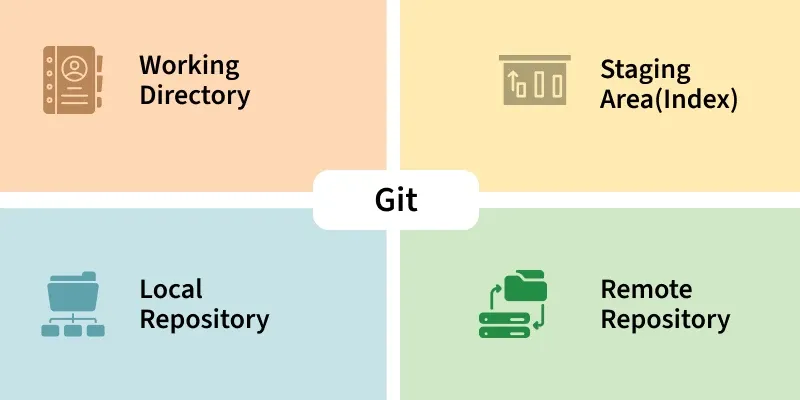
- There is a large community support with plenty of tutorials, guides, and forums.
- Constant updates and improvements from contributors worldwide.
- No licensing cost; anyone can use it freely for personal or commercial projects.
Example: Popular platforms like GitHub and GitLab are built on Git and benefit from its open-source nature, creating an ecosystem for collaborative development.
2. Distributed System
Unlike centralized version control systems, Git is fully distributed. Every developer has a complete copy of the repository, including all history, branches, and tags.
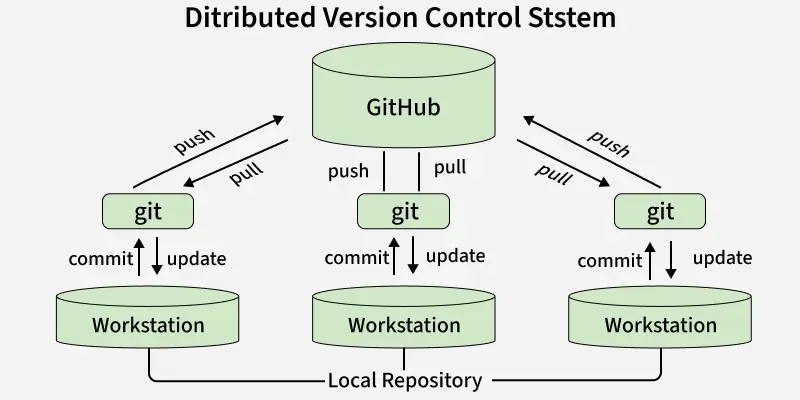
- Work offline and commit changes without a network connection.
- Redundancy ensures backups across multiple local repositories.
- Faster operations since most actions are local.
- Enables non-linear development with multiple branches.
Example: You and your teammate can both make changes to the project on your own computers and later merge your work without needing to be connected to a server.
3. Branching
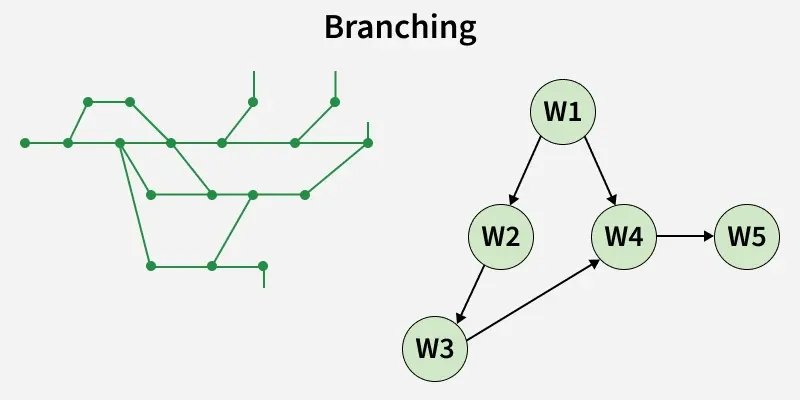
A branch in Git is like a parallel version of your code, allowing you to work on different tasks independently without affecting the main codebase.
- Lets you develop new features, fix bugs, or experiment safely.
- Each branch maintains its own set of commits and changes.
- You can later merge your branch back into the main branch once the work is complete.
- Helps in isolating issues, so bug fixes don’t interfere with other development work.
Types of Branches
- Main Branch: The primary stable codebase, usually
main or master. - Feature Branches: For new features, e.g.,
feature-login. - Bugfix Branches: For fixing bugs, e.g.,
bugfix-header. - Release Branches: For preparing a version for production.
Example
If a bug is found in the main branch, you can create a separate bugfix branch, fix the issue there, test it, and then merge it back into the main branch - keeping your production code stable during the process.
4. Merging
- Merging is the process of combining changes from one branch into another.
- Typically, you merge a feature branch into the main branch after development is complete.
- Git tries to automatically integrate changes, but sometimes conflicts need to be resolved manually.

Types of Merges
1. Fast-Forward Merge
- Happens when the main branch has not moved forward since the branch was created.
- Git just moves the main branch pointer forward to the latest commit.
2. Three-Way Merge
- Happens when both branches have new commits since they diverged.
- Git creates a new merge commit that combines changes.
3. Merge Conflicts
- Occurs when changes on both branches affect the same line of a file.
- Git cannot automatically merge and asks you to resolve conflicts manually.
5. History Tracking
Git keeps a complete history of all changes to the codebase. Every commit is recorded with a timestamp, author, and a message describing the change.
- You can see the evolution of the project over time.
- Ability to revert to a previous state if something breaks.
- Helps identify bugs by checking which changes introduced an issue.
Example: If a new feature causes a bug, you can review the commit history to find exactly which changes caused the problem and fix it.
6. Staging Area(Index)
Git has a staging area (index) where changes can be reviewed before being committed. This allows selective commits instead of committing all changes at once.
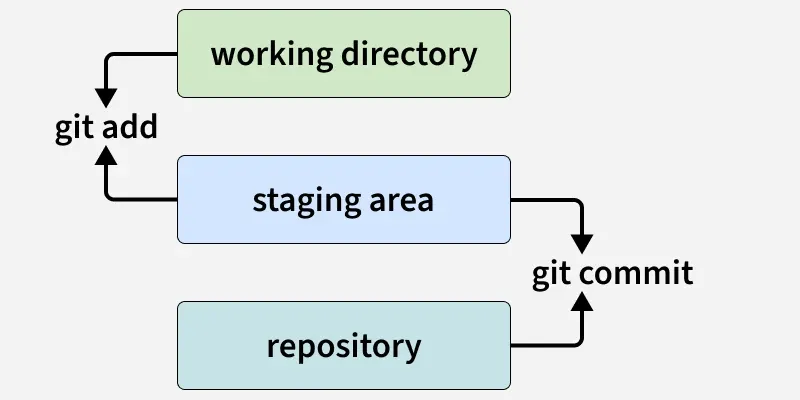
- Enables careful review of code changes before they become part of the history.
- Helps in splitting large changes into smaller, meaningful commits.
Example: You edited three files but only want to commit two. You can stage only those two files and commit them, leaving the third file for later.
7. Speed
Git is highly optimized for speed. Its underlying data structures, such as the SHA-1 hash and compressed snapshots, make operations like committing, branching, and merging very fast.
- Efficient for large projects with thousands of files.
- Fast operations allow developers to experiment and iterate quickly.
Example: Creating a new branch or switching between branches takes almost no time, even for large codebases.
8. Security
Git uses cryptographic SHA-1 hashes to ensure the integrity of the codebase. Each commit has a unique hash that represents its content and history.
- Tampering is detectable because any change in the code changes the hash.
- Ensures the authenticity of commits.
Example: If someone tries to change old commits, Git will detect that the hashes don’t match, protecting the code from unnoticed tampering.
9. Collaboration
Git makes teamwork seamless by allowing multiple developers to work on the same codebase.
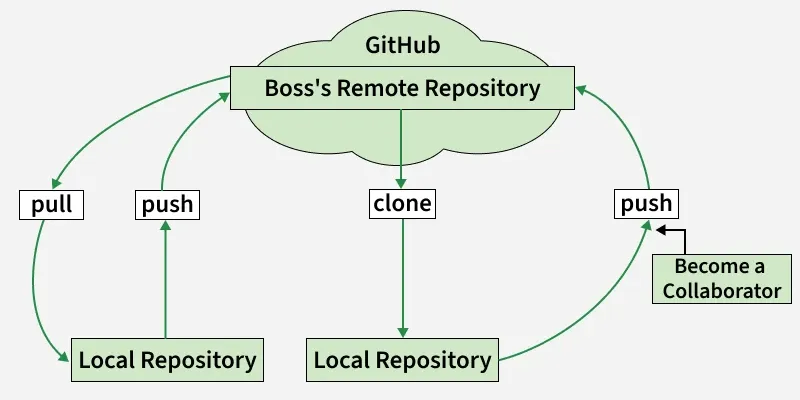
- Developers can clone repositories and contribute independently.
- Changes can be merged smoothly.
- Platforms like GitHub/GitLab provide pull requests and code reviews for effective collaboration.
Git works across major operating systems including Windows, Linux, and macOS.
- Provides consistent performance on all platforms.
- Wide adoption across teams with different systems.
Git integrates seamlessly with DevOps pipelines and CI/CD tools like Jenkins, GitHub Actions, and GitLab CI.
- Continuous Integration (CI): Every commit triggers automated builds and tests.
- Continuous Deployment (CD): Tested code can be automatically deployed to staging or production.
- Branch-based workflows: Different branches can trigger different pipelines (e.g.,
dev - test, main - production). - Tool Support: Works with Jenkins, GitHub Actions, GitLab CI, CircleCI, AWS CodePipeline, etc.
Explore
Git Introduction
Git Installation and Setup
All Git Commands
Most Used Git Commands
Git Branch
Git Merge
Git Tools and Integration
Git Remote Repositories
Collaborating with Git
Advanced Git Commands