The Git index is a staging area where you can gather changes you intend to include in your next commit. When you modify files in your working directory, those changes are not immediately added to your repository. Instead, you first add them to the index. This gives you the flexibility to choose which changes to commit, helping you create meaningful and atomic commits.
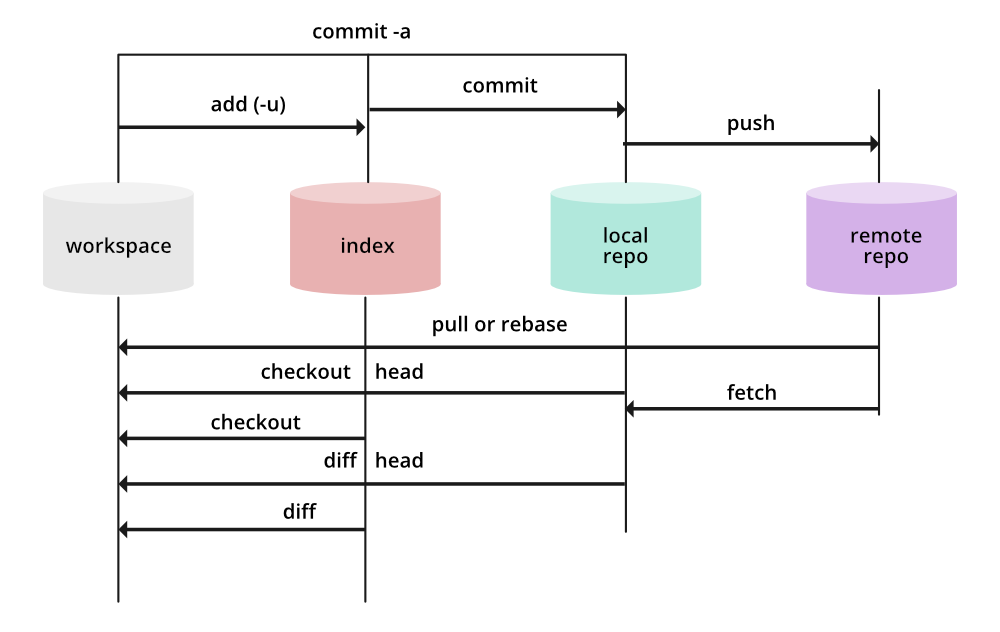
Here we can see 4 different places where a file may reside, so let's discuss them one by one.
A. Workspace: Whenever you work anything new on Git and it's untracked then it remains in the workspace. All of these remain in your computer filesystem, and you can later add them to the staging area or index, directly commit it.
B. Staging Area (.index): You can add your files from the workspace to the staging area. Before adding them you can check if, there exists any untracked file by using the command:
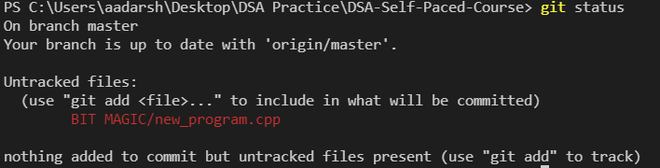
git status
Example: Here we have an untracked file named new_program.cpp, then using the above command the produced output would be:
We can add the following to our tracked files by using the command, we can use any of below commands depicted below
git add -A
git add .
This command will add all the untracked changes from the code to the staging area. You can also specify particular changes using the command
git add [file]
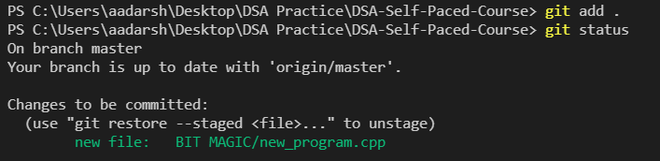
The staged file means it is in the staging area, i.e., in the index. you can also unstaged your changes using the command:
git restore --staged <file>
C. Local Repository: The entire work of Git is based on this repository, it tracks the history and safeguards it. It also helps the user switch between the previous versions. You can commit your changes into your repository directly, using the command:
git commit -m [message]
D. Remote Repository: If the repository is also located remotely then it is known as the remote repository. A remote repository can be accessed from anywhere with correct credentials. You can push all your changes to your remote repository using the command:
git push
Importance of the Git Index
- Selective Staging: The index allows you to stage-specific changes while leaving others uncommitted, enabling you to create more focused and coherent commits.
- Review and Organize Changes: You can review the changes in the index before committing them, ensuring accuracy and completeness.
- Building Atomic Commits: By staging related changes together, you can build atomic commits that represent single units of work, making the project history cleaner and easier to understand.
- Managing Partial Changes: The index supports partial staging, allowing you to commit only parts of a file's changes, which is useful for managing large or mixed updates.
-
A remote backup of the repository
-
A temporary file storage inside .git folder
-
A staging area where files are placed before commit
-
Explanation:
The Git Index (staging area) stores changes selected for the next commit, allowing controlled and organized commits
Which command adds files from the workspace to the Git index?
-
-
git restore --staged <file>
-
-
Explanation:
git add moves modified/untracked files from working directory to staging area (index).
Which command is used to unstage a file from the Git index?
-
-
git restore --staged <file>
-
-
Explanation:
git restore --staged <file> removes staged changes back to the working directory.
Which of the following describes the workspace in Git?
-
Stores commit history permanently
-
Contains files currently tracked in remote
-
Contains untracked or modified files before staging
-
A copy of repository metadata
Explanation:
The workspace (working directory) holds actual project files, whether modified or untracked, before they are staged.
Why is the Git Index important?
-
It automatically commits all changes
-
It allows selective staging and helps create clean atomic commits
-
It stores remote branches
-
Explanation:
The index gives control over what enters a commit — enabling partial staging, selective commits, and better project organization.
Quiz Completed Successfully
Your Score : 2/5
Accuracy : 0%
Login to View Explanation
1/5
1/5
< Previous
Next >
Explore
Git Introduction
Git Installation and Setup
All Git Commands
Most Used Git Commands
Git Branch
Git Merge
Git Tools and Integration
Git Remote Repositories
Collaborating with Git
Advanced Git Commands