Understanding Git-Ignore and Its Usage
Last Updated :
06 Nov, 2025
Gitignore is a special file in Git that tells the system which files or folders to ignore when committing code. It helps keep your repository clean by excluding unnecessary files like logs, temporary data, and system-generated files.
- Prevents unwanted or sensitive files from being tracked by Git.
- You can list file names, extensions, or folder paths inside
.gitignore to exclude them. - Keeps the repository lightweight, secure, and easy to manage.
Creating .gitignore file (.gitignore)
Step 1: Open your terminal/cmd and change your directory to the folder where your files are located. You can use " ls -a" command to view its contents.
cd directory(or)folder
ls -a
Here, the project files are saved inside folder named story which is further inside web development. Here, we want git to ignore the secrets.txt file.
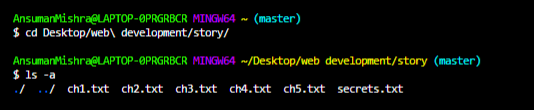
Step 2: Create .gitignore File inside the project folder.
Step 3: Write the name of the files you want to ignore in the .gitignore text file. Each file name should be written in a new line.
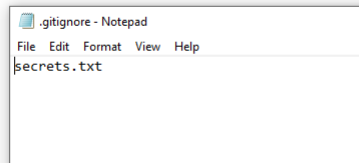
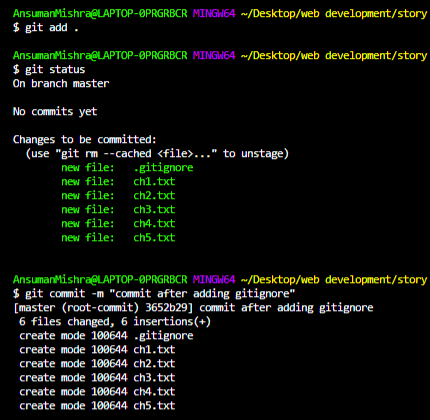
Step 4: Initialize git in your terminal. Add these files to your git repository and commit all the changes with an appropriate message.
git init
git add .
git commit -m "your message"
Step 5: Check the status of the git repository. The file(s) added to the .gitignore text file will be ignored by the git every time you make any changes and commit.
git status
Examples
# Compiled class file
*.class

# Log file
*.log

# Mobile Tools for Java (J2ME)
.mtj.tmp/

# Package Files
*.jar

*.war

*.nar

*.ear

*.zip

*.tar.gz

*.rar
- Blank Line: Used to separate entries for readability.
# : Denotes a comment. Use \# to include # as a pattern./ : Directory separator, e.g., webdev/ to ignore a folder.*.extension : Matches all files with a specific extension, e.g., *.txt, *.log.**/name : Matches any file or directory named name.name/** : Matches everything inside the directory name, e.g., webdev/**.
gitignore Rules (.gitignore)
- The file which are going to be mention in the .gitignore file must be in the specific pattern.
- The .gitignore file will be read by the git from top to bottom approach.
- .gitignore file will supports negation which uses ! as prefix.
- *.log know it will ignores all the file with the .log.
- build/ it will ignores all the build directory.
- You can comment the lines in the .gitignore file by using the (#).
Local and Personal Git Ignore Rules (.gitignore)
Local Git Ignore Rules
There will one .gitignore file in the local repository in this file and all the files and the directories which should be ignored are mentioned and it will be shared with the others unless you commit and push it to the remote repository. It applicable only to single and particular repository where the file to be ignored.
Personal Git Ignore Rules
You can set up an .gitignore file which can be applied to the all the git repositories. It will not shared with any other collaborators.
Steps To Create a global .gitignore file
Step 1: Create .gitignore file as following.
touch ~/.gitignore_global
Step 2: Add the required rules to the .gitignore file as shown below.
# ~/.gitignore_global
*.swp
.DS_Store
Step 3: Know we need to make this file as an golbal .gitignore file.
git config --global core.excludesfile ~/.gitignore_global
How to undo any commits?
Before using .gitignore to ignore certain files, if you have already committed files you didn't want to here's how you can undo it. Use the following command on Git Bash to undo a commit:
git rm --cached -r
Here, "rm" stands for remove while "r" stands for recursive.
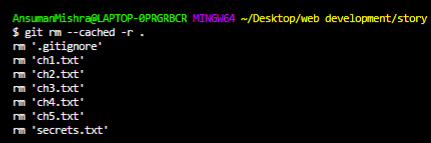
Note: Head over to the GitHub and search for gitignore repositories, you will find a list of gitignore repositories contributed by various people.
What is the main purpose of a .gitignore file in a Git project?
-
To delete unwanted files from the repository
-
To prevent Git from tracking specified files or directories
-
To encrypt sensitive project files
-
To automatically commit only selected files
Explanation:
A .gitignore file is used to tell Git which files or folders should not be tracked. This is useful for excluding logs, temporary data, system files, compiled binaries, or sensitive information like passwords. Ignored files remain in the project folder but are never staged or committed.
Which pattern in .gitignore would ignore all files with the .log extension?
Explanation:
The pattern *.log matches any file ending with the .log extension, regardless of its directory. This is one of the most common patterns used to prevent error logs or runtime logs from being committed.
What is the purpose of creating a global .gitignore file?
-
To apply ignore rules to only one repository
-
To share ignore rules with all collaborators
-
To apply ignore rules across all Git repositories for a single user
-
To override local .gitignore files permanently
Explanation:
A global .gitignore is used for ignore patterns that apply to all repositories for one user, such as system files (.DS_Store, *.swp). It is not shared with collaborators and helps maintain cleaner repositories across projects.
Which command is used to remove a previously committed file from Git’s tracking while keeping it in the working directory?
Explanation:
The command git rm --cached removes a file from Git’s index (staging area) without deleting it from the local folder. This is used when you accidentally commit a file that should have been ignored, such as a secrets.txt or build file.
Which of the following is true about .gitignore rule processing?
-
Git reads .gitignore bottom to top
-
! can be used to unignore files that were previously ignored
-
Comments are not allowed inside .gitignore
-
.gitignore ignores files permanently even after being committed
Explanation:
Git processes .gitignore rules from top to bottom, and the negation operator (!) allows you to unignore a file or folder that matches an earlier ignore rule. Comments start with #, and already committed files are not ignored unless removed with git rm --cached.
Quiz Completed Successfully
Your Score : 2/5
Accuracy : 0%
Login to View Explanation
1/5
1/5
< Previous
Next >
Explore
Git Introduction
Git Installation and Setup
All Git Commands
Most Used Git Commands
Git Branch
Git Merge
Git Tools and Integration
Git Remote Repositories
Collaborating with Git
Advanced Git Commands