Globalizing Django Applications: Internationalization and Localization
Last Updated :
17 Nov, 2025
Globalizing Django applications enhances accessibility for users across various languages and regions. Django’s built-in internationalization (i18n) and localization (l10n) tools streamline the adaptation of content, formats, and interfaces for global use.
Internationalization (i18n)
Internationalization prepares a Django application for use in different languages and regions by separating text that needs translation and supporting various locale formats.
- Translatable elements are marked so that text can be easily translated.
- UTF-8 encoding allows the use of many language scripts and characters.
- Locale settings adjust dates, times, numbers, and currency for each region.
- Ensures the application can adapt smoothly to different languages and cultures.
By enabling these features, developers can create a single adaptable codebase ready for localization, reducing overhead and improving scalability.
Localization (l10n)
Localization applies internationalization settings to a specific language or region, making the application match local expectations and cultural standards.
- Uses translation files to show text in the user’s language.
- Supports right-to-left layouts for languages like Arabic and Hebrew.
- Adjusts numbers, dates, and measurements to regional formats.
- Ensures the application feels natural to users in each locale.
Effective localization delivers a seamless user experience, ensuring that applications feel native to every market they serve.
Translation Management with GNU gettext
Django uses the GNU gettext framework to handle translations smoothly and support multiple languages accurately.
- Handles plural forms correctly for different languages.
- Provides context when a word has more than one meaning.
- Makes it easy to extract, translate, and compile message files.
- Supports a clean and organized workflow for managing translations.
This integration ensures consistent, maintainable and scalable translation management within Django projects.
Django's Approach to Internationalization and Localization
Django’s framework integrates i18n and l10n seamlessly:
- Translation Engine: Uses gettext to mark and retrieve strings, with lazy evaluation for deferred processing.
- Locale Detection: Determines user locale via Accept-Language headers, sessions, cookies, or URL prefixes through LocaleMiddleware.
- Formatting Adapters: Applies locale-aware rendering for dates, times, numbers, and currencies when USE_L10N is enabled.
- Plural and Context Support: Manages language-specific plurals with ngettext and disambiguates context using pgettext.
- Enhanced RTL Handling: Improves accessibility for bidirectional text, including proper form encoding for localized inputs.
- Fallbacks and Timezones: Defaults to a base locale (e.g., en-us) when translations are unavailable, while USE_TZ ensures timezone-aware displays via pytz.
Configuring Django App for Internationalization and Localization
Consider a project named 'globalapp' having an app named 'myapp'.
Step 1: Include the following configuration in settings.py:
Python
from pathlib import Path

BASE_DIR = Path(__file__).resolve().parent.parent

# CORE SETTINGS
USE_I18N = True
USE_L10N = True
USE_TZ = True

LANGUAGE_CODE = 'en-us'

LANGUAGES = [
    ('en', 'English'),
    ('es', 'Spanish'),
]

LOCALE_PATHS = [
    BASE_DIR / 'locale',
]

INSTALLED_APPS = [
    'django.contrib.admin',
    'django.contrib.auth',
    'django.contrib.contenttypes',
    'django.contrib.sessions',
    'django.contrib.messages',
    'django.contrib.staticfiles',
    'myapp',
]

MIDDLEWARE = [
    'django.middleware.security.SecurityMiddleware',
    'django.contrib.sessions.middleware.SessionMiddleware',
    'django.middleware.locale.LocaleMiddleware',  # MUST BE HERE
    'django.middleware.common.CommonMiddleware',
    'django.middleware.csrf.CsrfViewMiddleware',
    'django.contrib.auth.middleware.AuthenticationMiddleware',
    'django.contrib.messages.middleware.MessageMiddleware',
    'django.middleware.clickjacking.XFrameOptionsMiddleware',
]
Note: django.contrib.internationalization is not needed and causes errors in Django 4.0+.
Step 2 : Create locale/ Directory
mkdir locale
Step 3: Set Up URLs (globalapp/urls.py)
Python
from django.contrib import admin
from django.urls import path, include
from django.conf.urls.i18n import i18n_patterns
from django.conf.urls.i18n import set_language  # Import for switcher

urlpatterns = [
    path('admin/', admin.site.urls),
    path('i18n/', set_language, name='set_language'),  # Add language switcher
]

# Prefixes all included URLs with the active language code (e.g., /en/, /es/)
urlpatterns += i18n_patterns(
    path('', include('myapp.urls')),
)
Step 4: Create View (myapp/views.py)
Python
from django.shortcuts import render
from django.utils.translation import gettext as _
from django.utils.translation import ngettext
from datetime import datetime


def home(request):
    # Simple translatable string
    greeting = _("Hello, world!")

    # Plural example
    items = 2
    plural_text = ngettext(
        "One item available.", "%(count)s items available.", items
    ) % {"count": items}

    # Localized date
    from django.utils import formats

    localized_date = formats.date_format(datetime.now(), "SHORT_DATE_FORMAT")

    context = {
        "greeting": greeting,
        "plural_text": plural_text,
        "localized_date": localized_date,
    }
    return render(request, "home.html", context)
Step 5: Create URL (myapp/urls.py)
Python
from django.urls import path
from . import views

urlpatterns = [
    path('', views.home, name='home'),
]
Step 6: Mark Model Fields( myapp/models.py):
Python
from django.db import models
from django.utils.translation import gettext_lazy as _

class Item(models.Model):
    # Stores the name of the item with a translatable label
    name = models.CharField(max_length=100, verbose_name=_('Item Name'))
    # Holds a detailed description with a translatable label
    description = models.TextField(verbose_name=_('Description'))

    class Meta:
        # Defines the singular translatable name for the model
        verbose_name = _('Item')
        # Defines the plural translatable name for the model
        verbose_name_plural = _('Items')
After creating this mode, nun Migrations.
Step 7: Create Template (myapp/templates/home.html)
HTML
{% load i18n %}
{% get_current_language as lang %}
<!DOCTYPE html>
<html lang="{{ lang }}">
<head>
    <meta charset="UTF-8">
    <title>{% trans "Home Page" %}</title>
</head>
<body>
    <h1>{{ greeting }}</h1>
    <p>{{ plural_text }}</p>
    <p>{% trans "Today is" %}: {{ localized_date }}</p>

    <p>{% blocktrans with user_count=42 %}This is a block translation with a variable: {{ user_count }} users.{% endblocktrans %}</p>

    <!-- Language switcher -->
    <ul>
        {% get_current_language as LANGUAGE_CODE %}
        {% get_available_languages as LANGUAGES %}
        {% for lang in LANGUAGES %}
            <li>
                <a href="{% url 'set_language' %}?language={{ lang.0 }}" {% if lang.0 == LANGUAGE_CODE %}class="selected"{% endif %}>
                    {{ lang.1 }}
                </a>
            </li>
        {% endfor %}
    </ul>
</body>
</html>
For Engish:
python manage.py makemessages -l en
For Spanish:
python manage.py makemessages -l es
This creates locale/en/LC_MESSAGES/django.po and locale/es/LC_MESSAGES/django.po with extracted strings (marked as fuzzy)
Step 12: Edit locale/es/LC_MESSAGES/django.po
#: myapp/models.py:5
msgid "Item Name"
msgstr "Nombre del artículo"
#: myapp/models.py:6
msgid "Description"
msgstr "Descripción"
#: myapp/models.py:9
msgid "Item"
msgstr "Artículo"
#: myapp/models.py:10
msgid "Items"
msgstr "Artículos"
#: myapp/templates/home.html:5
msgid "Home Page"
msgstr "Página de inicio"
#: myapp/templates/home.html:10
msgid "Today is"
msgstr "Hoy es"
#: myapp/templates/home.html:13
#, python-format
msgid "This is a block translation with a variable: %(user_count)s users."
msgstr "Esta es una traducción de bloque con una variable: %(user_count)s usuarios."
#: myapp/views.py:8
msgid "Hello, world!"
msgstr "¡Hola, mundo!"
#: myapp/views.py:12
#, python-format
msgid "One item available."
msgid_plural "%(count)s items available."
msgstr[0] "Un artículo disponible."
msgstr[1] "%(count)s artículos disponibles."
Step 13: Compile Translations
python manage.py compilemessages
Step 14: Run & Test
python manage.py runserver
Step 15: Output
English:
http://127.0.0.1:8000/en/
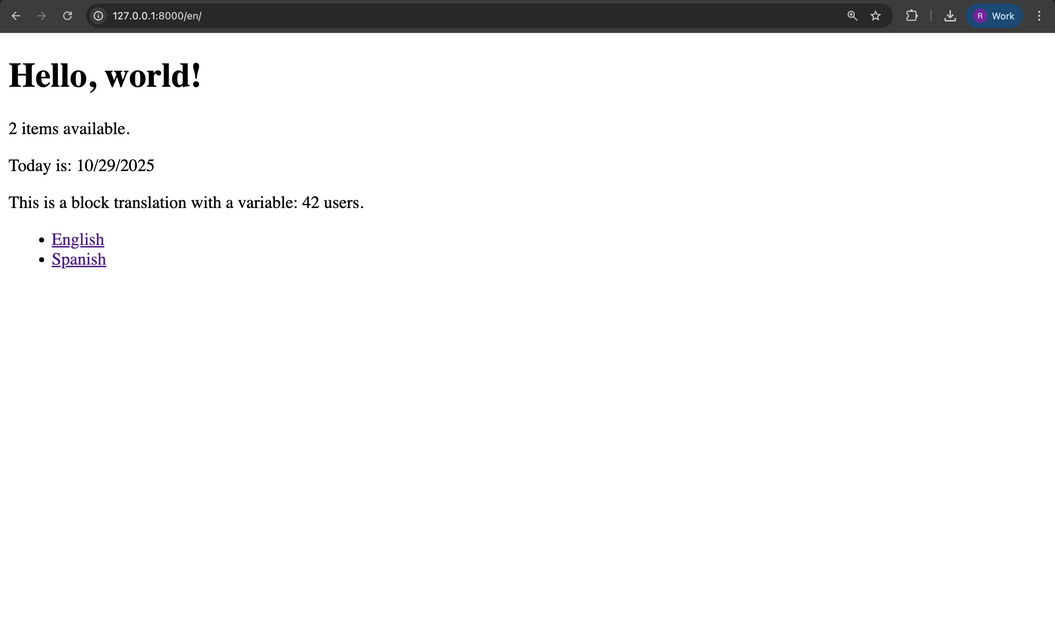 Engish-Language
Spanish:
http://127.0.0.1:8000/es/
 Spanish-Language
Django can automatically adapt date, time, and number formats for different locales.
Enable Localization
In settings.py:
USE_L10N = True # Automatic locale-based formatting
In Views:
Python
from django.utils import formats
from datetime import datetime
import decimal

now = datetime.now()

# Date and time formatting
date_str = formats.date_format(now, 'SHORT_DATE_FORMAT')  # e.g., 'Oct. 28, 2025' (en-us)
time_str = formats.time_format(now, 'SHORT_TIME_FORMAT')  # e.g., '3:45 P.M.'

# Number formatting
number_str = formats.number_format(decimal.Decimal('1234.56'), 2)  # e.g., '1,234.56'

# Currency symbol
currency_str = formats.get_format('CURRENCY')  # e.g., '$' or '€' depending on locale
In Templates:
HTML
{% load l10n %}

{{ now|date:"SHORT_DATE_FORMAT"|localize }}
{{ now|time:"SHORT_TIME_FORMAT"|localize }}
{{ value|floatformat:2|localize }}  <!-- e.g., 1.234,56 in de -->

{% localize on %}
    {{ now|date:"d.m.Y" }}  <!-- Custom format: 28.10.2025 -->
{% endlocalize %}
Use |unlocalize to display raw formats when needed.
Custom Per-Locale Overrides
Create a locale-specific formats.py (e.g: locale/es/formats.py):
DATE_FORMAT = 'd/m/Y' # e.g., 28/10/2025
NUMBER_GROUPING = 3
DECIMAL_SEPARATOR = ','
Django prioritizes these locale-specific settings over global settings. DATETIME_FORMAT follows locale precedence to maintain consistency.
Third-Party Packages for Enhanced Internationalization and Localization
Django's built-in i18n and l10n tools can be extended with third-party packages:
- django-modeltranslation: Auto-generates translated model fields; install via pip install django-modeltranslation.
- django-parler: Manages translations in dedicated tables for dynamic content like CMS pages.
- django-rosetta: Admin interface for collaborative .po editing.
- django-js-reverse: Generates URL patterns for JavaScript i18n.
Selection depends on project requirements. For example, django-modeltranslation is suitable for simple multilingual models in e-commerce applications.
Explore
Python Fundamentals
Python Data Structures
Advanced Python
Data Science with Python
Web Development with Python
Python Practice