The SQL LIKE operator is used to search for a specific pattern within a column’s text data. It works with wildcard characters to match partial strings, making it useful for flexible filtering.
- % represents any sequence of characters
- _ represents a single character
Example: First, we create a demo SQL database and table, on which we will use the LIKE Operator command.
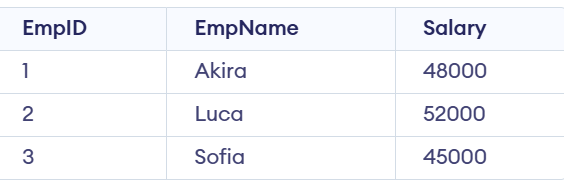
Query:
SELECT * FROM Employees
WHERE EmpName LIKE 'A%';
Output:

Syntax:
SELECT column1, column2, ...
FROM table_name
WHERE column_name LIKE pattern;
- column_name: The column to be searched.
- pattern: The pattern to search for, which can include wildcard characters.
Wildcard Characters with the SQL LIKE Operator
Wildcards are used with the LIKE operator to search for specific patterns in strings. Wildcard characters substitute one or more characters in the string. There are four wildcard characters in SQL:
- % (Percent): Represents zero or more characters.
- _ (Underscore): Represents a single character.
- [] (Square Brackets): Represents any single character within brackets.
- - (Hyphen): Specify a range of characters inside brackets.
| Pattern | Meaning |
|---|
| 'a%' | Match strings that start with 'a' |
| '%a' | Match strings with end with 'a' |
| 'a%t' | Match strings that contain the start with 'a' and end with 't'. |
| '%wow%' | Match strings that contain the substring 'wow' in them at any position. |
| '_wow%' | Match strings that contain the substring 'wow' in them at the second position. |
| '_a%' | Match strings that contain 'a' at the second position. |
| 'a_ _%' | Match strings that start with 'a and contain at least 2 more characters. |
Examples of SQL LIKE Operator
Let's understand TRUNCATE in SQL with examples. First, we will create a demo SQL database and table, on which we will use the SQL LIKE Operator command.
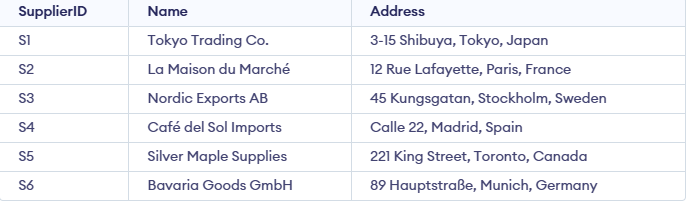
Example 1 : Match Names Starting with 'Ca'
Retrieve SupplierID, Name, and Address from suppliers table, where supplier name starts form k.
SELECT SupplierID, Name, Address
FROM Supplier
WHERE Name LIKE 'Ca%';
Output:

Example 2: Match Addresses Containing 'Kungsgatan'
Retrieve entire table, where address contains OKHLA.
SELECT *
FROM Supplier
WHERE Address LIKE '%Kungsgatan%';
Output:

Example 3: Match Names Where 'afé' Appears in the Second Position
Retrieve SupplierID, Name and Address of supplier whose name contains "ango" in second substring.
SELECT SupplierID, Name, Address
FROM Supplier
WHERE Name LIKE '_afé%';
Output:

Example 4: Using LIKE with AND for Complex Conditions
Retrieve suppliers from Delhi with names starting with "C":
SELECT SupplierID, Name, Address
FROM Supplier
WHERE Address LIKE '%Madrid%' AND Name LIKE 'C%';
Output:

Example 5: Using NOT LIKE for Exclusion
To retrieve all suppliers whose name does not contain "Mango"
SELECT SupplierID, Name, Address
FROM Supplier
WHERE Name NOT LIKE '%Co%';
Output:

Note: For making the LIKE operator case-sensitive, you can use the "BINARY" keyword in MySQL or the "COLLATE" keyword in other database systems.
Explore
Basics
Queries & Operations
SQL Joins & Functions
Data Constraints & Aggregate Functions
Advanced SQL Topics
Database Design & Security