The LTRIM() function in SQL is an inbuilt string function that is used to remove the leading empty spaces from the left side of our data. The LTRIM function can also be used to remove a specific character or substring from the left side of the string.
- The LTRIM function is used to clean data in databases.
- It removes unnecessary leading characters or spaces from text values.
- Data administrators use it to streamline data cleaning tasks efficiently in one go.
Query:
Select LTRIM(' GeeksforGeeks.') AS trimmedString; Output:

Syntax:
LTRIM(Input_String, [Trim_Characters])
- Input_String: String from which you want to remove leading spaces.
- Trim_Characters: [optional] specified characters you want to remove.
Note: If we don't specify any characters to remove, the LTRIM function removes the white spaces for data cleaning and manipulation in SQL.
SQL LTRIM function Working
The following diagram shows how the SQL LTRIM function affects strings in the table.
 Workflow of LTRIM function
The function LTRIM in SQL analyzes the input string from the left side and removes any empty spaces or the mentioned character found on that string. The function does not alter the original string, it returns a new string where the leading whitespaces are removed.
This function doesn't deal with whitespaces present between the strings. For example if the string ' JOHN' was written as ' JO HN' then only the leading white spaces on the left side will be removed by this function and the spaces in between will remain as they were earlier.
SQL LTRIM Function Examples
Now let us see some examples of LTRIM function in different use cases to understand it's working better:
Example 1: Remove Specific Characters Using LTRIM Function
In this example, we will remove specific characters using LTRIM function.
Query:
SELECT LTRIM('----GeeksforGeeks', '-') AS TrimmedString;Output:

- Removes the - characters from the left side of the string.
- Returns the cleaned result as TrimmedString.
Example 2: Remove a Substring from a String Using LTRIM Function
In this example, we will remove a substring from a string using the LTRIM function.
Query:
SELECT LTRIM('GeeksforGeeks', 'Geeks') AS TrimmedString;Output:

- Removes the specified characters ‘Geeks’ from the left side of the string.
- Returns the remaining string as TrimmedString.
Example 3: Use LTRIM on a Table Column
Let us create a table where the names of the users are stored with whitespaces. If we want to remove these whitespaces then we can use the LTRIM in SQL to remove them in one go.
Query:
CREATE TABLE Users (
    Name VARCHAR(45)
);
INSERT INTO Users (Name) VALUES
    ('   Alice'), ('   Bob'), ('   Charlie'), ('   David'), ('   Eve');
Output:
 Users Table
Now to remove whitespace from this column, we can use the SQL query:
SELECT  LTRIM(Name) AS TrimmedNames
FROM Users;
Output:
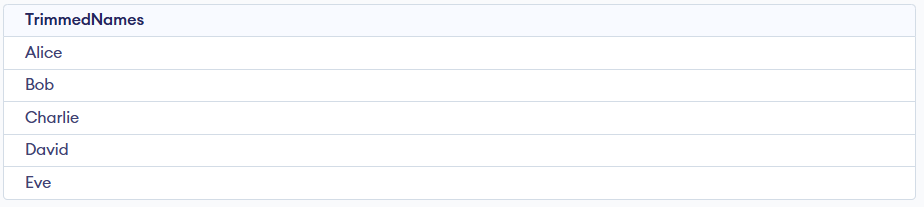
- Removes leading (left-side) spaces from the Name column.
- Displays the cleaned values as TrimmedNames.
Explore
Basics
Queries & Operations
SQL Joins & Functions
Data Constraints & Aggregate Functions
Advanced SQL Topics
Database Design & Security