In SQL, aliases provide temporary names for columns or tables to make queries cleaner and easier to understand. They are especially helpful in complex queries or when dealing with lengthy names.
Example: First, we create a demo SQL database and table, on which we will use the Aliases command.

Query:
SELECT EmpID AS id
FROM Employees;
Output:

- The query selects the EmpID column from the Employees table.
- It assigns a temporary alias id to the EmpID column in the result set.
- The output will display the employee IDs under the column name id.
Types of aliases
There are two types of aliases:
1. Column Aliases
A column alias is used to rename a column just for the output of a query. They are useful when:
- Displaying aggregate data
- Making results more readable
- Performing calculations
Syntax:
SELECT column_name AS alias_name
FROM table_name;
- column_name: column on which we are going to create an alias name.
- alias_name: temporary name that we are going to assign for the column or table.
- AS: It is optional. If you have not specified it, there is no effect on the query execution.
Let's understand Aliases in SQL with the help of example. First, we will create a demo SQL database and table, on which we will use the Aliases command.

Query:
SELECT CustomerID AS id
FROM Customer;
Output:

- The query retrieves the CustomerID column from the Customer table.
- It assigns a temporary alias id to the CustomerID column.
- The output displays customer IDs under the column name id.
2. Table Aliases
A table alias is used when you want to give a table a temporary name for the duration of a query. Table aliases are especially helpful in JOIN operations to simplify queries, particularly when the same table is referenced multiple times (like in self-joins).
Query:
SELECT c1.CustomerName, c1.Country
FROM Customer AS c1, Customer AS c2
WHERE c1.Age = c2.Age AND c1.Country = c2.Country;
Output:
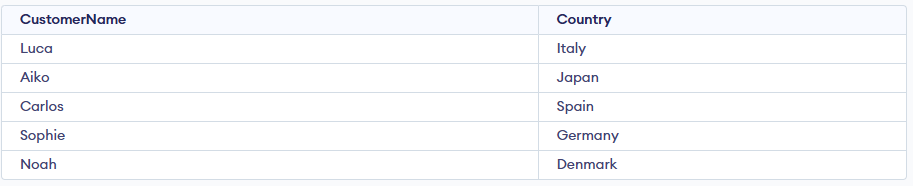
- The query uses table aliases (c1 and c2) for the same Customer table.
- It compares records where both the Age and Country values are the same.
- The condition c1.Age = c2.Age AND c1.Country = c2.Country finds customers who share the same age and country.
- The result displays each matching customer’s name and country.
Combining Column and Table Aliases
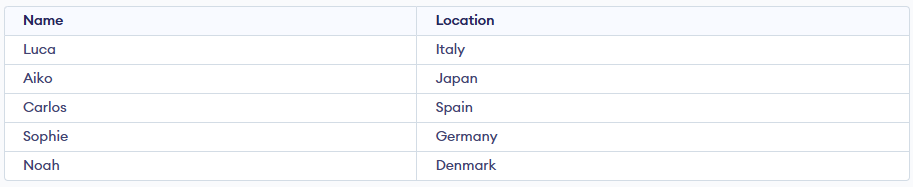
We want to fetch customers who are aged 21 or older and rename the columns for better clarity. We will use both table and column aliases.
Query:
SELECT c.CustomerName AS Name, c.Country AS Location
FROM Customer AS c
WHERE c.Age >= 21;
Output:
To alias a column or table is to give it a ____ value.
Explanation:
To alias, a column or table is to give it a temporary value.
What does the following code snippet do?
SELECT CustomerName, Address + ‘, ‘ + City + ‘, ‘ + Country AS Address
FROM Customers;
-
The query is fetching data from multiple columns, attaches the data from different columns with comma and show the data under aliased column name Address.
-
Alias named Address will be created for Country columns
-
Alias named Address column will be created and under this all CustomerName, address, city and country will be printed as combined statement
-
All above options are wrong
Explanation:
As Alias is mentioned with address a column will be created, and the data will be get printed accordingly.
What is the syntax of alias for column?
-
column_name AS alias_name
-
-
column_name AS column_name
-
alias_name AS column_name
Explanation:
Syntax for column is: column_name AS alias_name.
What are the attributes involved in the syntax of alias for table?
Explanation:
The parameters in the syntax of Oracle Aliases are -
i) Column_name ii) Table_name iii) Alias_name
An ____ is the temporary name of the table.
Explanation:
An alias_name is the temporary name of the table.
Quiz Completed Successfully
Your Score : 2/5
Accuracy : 0%
Login to View Explanation
1/5
1/5
< Previous
Next >
Explore
Basics
Queries & Operations
SQL Joins & Functions
Data Constraints & Aggregate Functions
Advanced SQL Topics
Database Design & Security