In SQL, the ALL and ANY operators are used to compare a value against a set of values returned by a subquery. They help filter results based on conditions evaluated over multiple values.
- ALL checks if a condition is true for every value in the subquery result.
- Must be used with comparison operators like >, <, >=, <=.
- Used in SELECT, WHERE, and HAVING for advanced filtering.
SQL ALL
The SQL ALL operator compares a value to every value returned by a subquery. A condition using ALL is TRUE only if it holds for all values in the subquery result.
- Must be used with comparison operators: >, <, >=, <=.
- Useful for filtering data based on comparisons with multiple records.
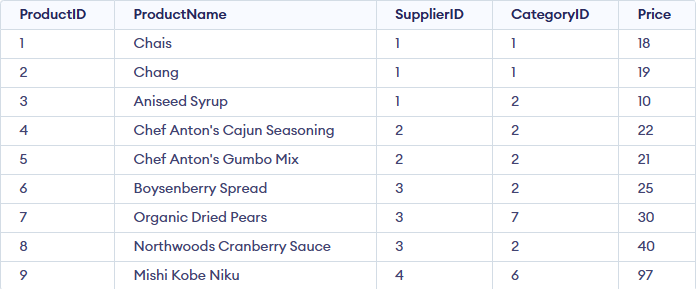
Example: First, we will create a demo SQL database and table, on which we will use the ALL command.
 Products Table
Query:
SELECT * FROM Products
WHERE Price > ALL (SELECT Price FROM Products WHERE Price < 500);
Output:

Syntax:
SELECT column_name(s)
FROM table_name
WHERE column_name comparison_operator ALL
  (SELECT column_name
   FROM table_name
   WHERE condition(s));
- comparison_operator: This is the comparison operator that can be one of =, >, <, >=, <=, <>, etc.
- subquery: A query that returns the set of values to be compared with the column in the outer query.
SQL ALL with SELECT, WHERE, and HAVING
The ALL operator can be used in conjunction with SELECT, WHERE, and HAVING statements to refine your data filtering.
Products Table
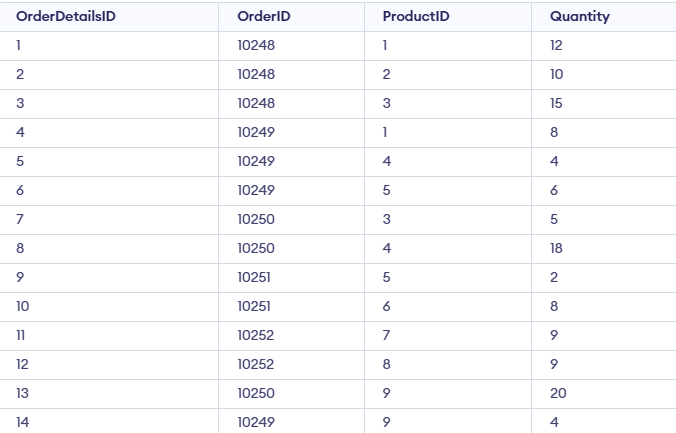
OrderDetails Table
Example 1 : Retrieve all product names from the Products table.Query:
SELECT ALL ProductName
FROM Products
WHERE TRUE;
Output:

This query retrieves all product names from the Products table because TRUE always evaluates as true for every row.
Example 2: Retrieve product names if all records in the OrderDetails table have a quantity of 6 or 2.
SELECT ProductName
FROM Products
WHERE ProductID = ALL (SELECT ProductID
                       FROM OrderDetails
                       WHERE Quantity = 6 OR Quantity = 2);
Output:

This query ensures that the product names returned have ALL quantities of 6 or 2 in the OrderDetails table.
Example 3 : Find the OrderIDs where the maximum quantity in the order exceeds the average quantity of all orders.
SELECT OrderID
FROM OrderDetails
GROUP BY OrderID
HAVING MAX(Quantity) > ALL (SELECT AVG(Quantity)
                            FROM OrderDetails
                            GROUP BY OrderID);
Output:

This query filters out OrderIDs where the maximum quantity is greater than the average quantity of the orders.
SQL ANY Operator?
ANY compares a value to each value in a list or results from a query and evaluates to true if the result of an inner query contains at least one row.
- ANY return true if any of the subqueries values meet the condition.
- ANY must be preceded by comparison operators.
Example: First, we will create a demo SQL database and table, on which we will use the ANY command.

Query:
SELECT * FROM Products
WHERE Price < ANY (SELECT Price FROM Products WHERE Price > 500);
Output:

Syntax:
SELECT column_name(s)
FROM table_name
WHERE column_name comparison_operator ANY
  (SELECT column_name
   FROM table_name
   WHERE condition(s));
SQL ANY with SELECT, WHERE, and HAVING
The ANY operator can be used with SELECT, WHERE, and HAVING clauses to filter data by matching a condition against any value in a subquery result.
Example 1 : Find distinct category IDs of products that appear in the OrderDetails table.
Query:
SELECT DISTINCT CategoryID
FROM Products
WHERE ProductID = ANY (SELECT ProductID
                       FROM OrderDetails);
Output:
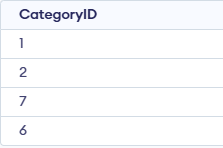
This query finds the distinct CategoryIDs of products that exist in the OrderDetails table.
Example 2 : Find product names with a quantity of 9 in the OrderDetails table.
Query:
SELECT ProductName
FROM Products
WHERE ProductID = ANY (SELECT ProductID
                       FROM OrderDetails
                       WHERE Quantity = 9);
Output:
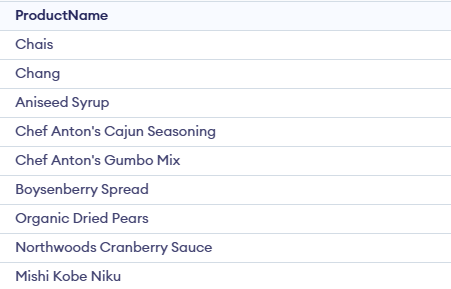
This query retrieves product names where at least one record in the OrderDetails table has a quantity of 9.
SQL ALL Vs SQL ANY
Here is the detailed comparison between SQL ALL and SQL ANY
SQL ALL | SQL ANY |
|---|
Condition must be true for every value in the subquery | Condition must be true for at least one value in the subquery |
More restrictive | Less restrictive |
Usually returns fewer rows | Usually returns more rows |
value > ALL(subquery) → value is greater than all values | value > ANY(subquery) → value is greater than any one value |
When comparing against a strict range | When comparing against flexible conditions |
Explore
Basics
Queries & Operations
SQL Joins & Functions
Data Constraints & Aggregate Functions
Advanced SQL Topics
Database Design & Security