The SQL DISTINCT clause is used to remove duplicate values from query results. It ensures that the output shows only unique records for the specified column(s).
Example: First, we will create a demo SQL database and table, on which we will use the Distinct Clause command.

Query:
SELECT DISTINCT Department
FROM Employees;
Output:

Syntax:
SELECT DISTINCT column1, column2
FROM table_name
- column1, column2: Names of the fields of the table.
- Table_name: Table from where we want to fetch the records.
Note: If used on multiple columns, DISTINCT returns unique combinations of values across those columns.
Examples of DISTINCT in SQL
Let’s create a sample table and populate it with some duplicate entries. We will see some examples of using the DISTINCT keyword with a sample students table.
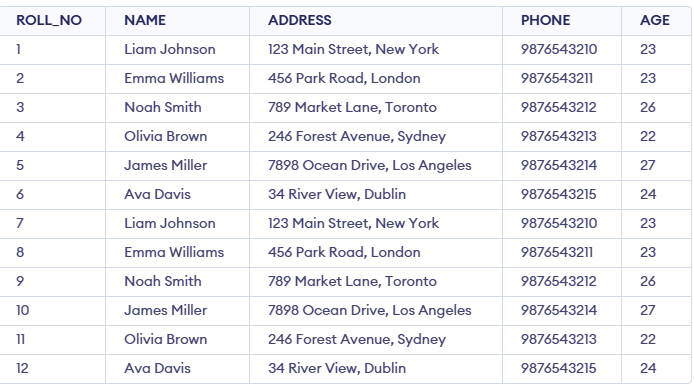
Example 1: Fetch Unique Names from the NAME Field.
The query returns only unique names, eliminating the duplicate entries from the table.
Query:
SELECT DISTINCT NAME FROM students;
Output:
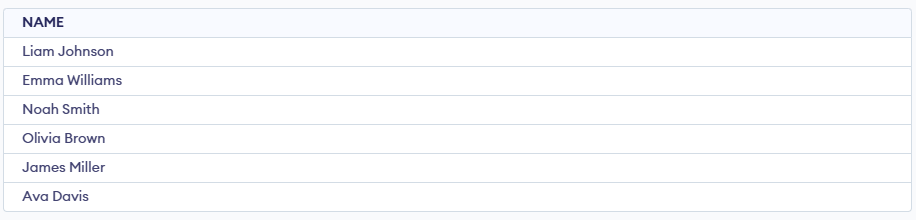
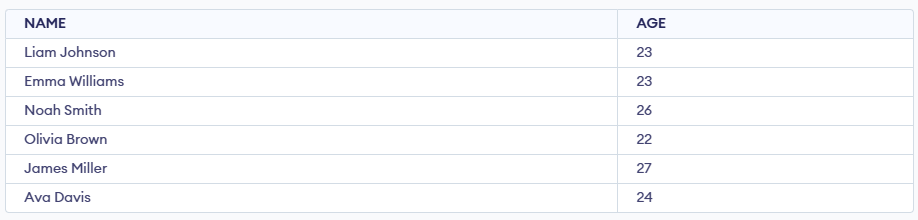
Example 2: Fetching Unique Combinations of Multiple Columns
This query retrieves distinct combinations of NAME and AGE — if two rows have the same name and age, only one of them will appear in the result set.
Query:
SELECT DISTINCT NAME, AGE FROM students;
Output:
Example 3: Using DISTINCT with the ORDER BY Clause
We can combine the DISTINCT keyword with the ORDER BY clause to filter unique values while sorting the result set. This query retrieves the unique ages from the students table and sorts them in ascending order.
Query:
SELECT DISTINCT AGE FROM students ORDER BY AGE;
Output:

Example 4: Using DISTINCT with Aggregate Functions (e.g., COUNT())
Here, we will check the COUNT() function with a DISTINCT clause, which will give the total number of students by using the COUNT() function.
Query:
SELECT COUNT(DISTINCT ROLL_NO) FROM Students ;
Output:

Example 5: DISTINCT with NULL Values
In SQL, the DISTINCT keyword treats NULL as a unique value. NULL is treated as a distinct value, so it will appear only once if there are multiple NULLs.
Query:
INSERT INTO students (ROLL_NO, NAME, ADDRESS, PHONE, AGE)
VALUES (13, 'John Doe', '123 Unknown Street', '9876543216', NULL);

SELECT DISTINCT AGE FROM students;
Output:

What is the main purpose of the DISTINCT clause?
-
-
-
-
To remove duplicate values
Explanation:
DISTINCT filters out duplicates so only unique values appear in the result set.
What happens when DISTINCT is used on multiple columns?
-
Only the first column is checked
-
SQL returns unique combinations of the selected columns
-
SQL removes duplicates based on each column separately
-
Explanation:
DISTINCT applied to multiple columns returns unique value pairs (combinations).
Which query correctly retrieves unique ages in ascending order?
-
SELECT AGE DISTINCT FROM students ORDER BY AGE;
-
SELECT ORDER BY AGE DISTINCT FROM students;
-
SELECT DISTINCT AGE FROM students ORDER BY AGE;
-
SELECT UNIQUE AGE ORDER BY AGE FROM students;
Explanation:
DISTINCT filters unique values, and ORDER BY sorts them afterward, exactly as in the article's Example 3.
What does this query return?
SELECT COUNT(DISTINCT ROLL_NO) FROM Students;
-
-
Count of unique roll numbers
-
Count of duplicate roll numbers
-
Explanation:
COUNT(DISTINCT column) returns the number of unique non-duplicate entries in that column.
How does DISTINCT treat NULL values?
-
-
-
-
Treats every NULL as a duplicate
Explanation:
DISTINCT considers NULL as a unique value, so it appears only once even if repeated.
Quiz Completed Successfully
Your Score : 2/5
Accuracy : 0%
Login to View Explanation
1/5
1/5
< Previous
Next >
Explore
Basics
Queries & Operations
SQL Joins & Functions
Data Constraints & Aggregate Functions
Advanced SQL Topics
Database Design & Security