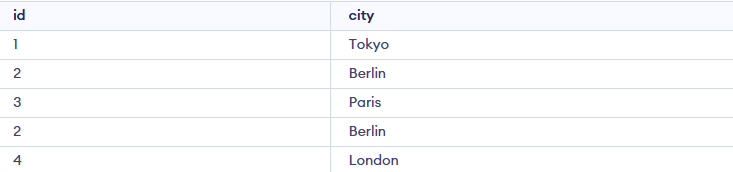
UNION ALL Operator is used to combine the results of two or more SELECTstatements into a single result set. Unlike the UNION operator, which eliminates duplicate records and UNION ALL includes all duplicates. This makes UNION ALL it faster and more efficient when we don't need to remove duplicates.
Example: First, we create a demo SQL database and tables, on which we will use the UNION ALL command.
Table 1:

Table 2:

Query:
SELECT id, city FROM city_table1
UNION ALL
SELECT id, city FROM city_table2;
Output:
Syntax:
SELECT columns FROM table1
UNION ALL
SELECT columns FROM table2;
Examples of SQL UNION ALL
Let's look at some examples of the UNION ALL command in SQL to understand its working. First, let's create a demo SQL database and tables on which UNION ALL will be performed.
STUDENTS table:
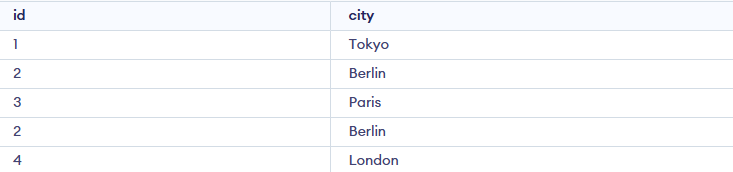
TRIP_DETAIL Table:

Example 1: Single Field With Same Name
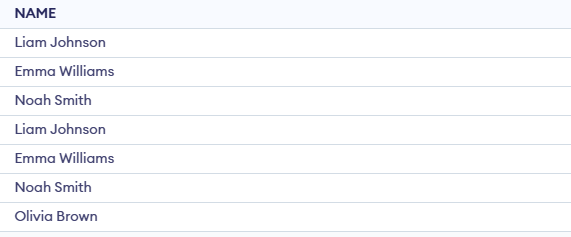
We want to combine the names from both the STUDENTS and TRIP_DETAIL tables, including all names, even if there are duplicates.
SELECT NAME FROM STUDENTS
UNION ALL
SELECT NAME FROM TRIP_DETAIL;
Output:
Example 2: Different Field Names
Suppose We want to combine the ROLL_NO from both tables and align the column names for consistency.
Query:
SELECT ROLL_NO AS Identifier FROM STUDENTS
UNION ALL
SELECT ROLL_NO AS Identifier FROM TRIP_DETAIL;
Output:

SQL UNION ALL With WHERE
You can use the WHERE clause with UNION ALL in SQL. The WHERE clause is used to filter records and is added after each SELECT statement
Example : SQL UNION ALL with WHERE
The following SQL statement returns the cities (duplicate values also) from both the "STUDENTS table" and the "TRIP_DETAIL Table" tables:
Query:
SELECT Country, Name FROM Emp1WHERE Name='Adi'UNION ALLSELECT Country, Name FROM Emp2WHERE Country='Ireland'ORDER BY Country;
Output:

SQL UNION All vs UNION
Here is the comparison between UNION ALL and UNION Operator:
| Feature | UNION ALL | UNION |
|---|
| Duplicate Records | Includes all duplicates | Removes duplicate records |
| Performance | Faster, as it doesn't check for duplicates | Slower, as it needs to eliminate duplicates |
| Use Case | When duplicates are acceptable or needed | When duplicates need to be removed |
| Syntax | SELECT columns FROM table1 UNION ALL SELECT columns FROM table2; | SELECT columns FROM table1 UNION SELECT columns FROM table2; |
| Memory Usage | Generally lower, since no extra processing for duplicates | Higher, due to additional steps for duplicate removal |
| Result Set | Combined rows from all SELECT statements, including duplicates | Combined rows from all SELECT statements, without duplicates |
| Applicability | Useful for large datasets where performance is critical and duplicates are acceptable | Useful when data integrity requires unique records in the result set |
Explore
Basics
Queries & Operations
SQL Joins & Functions
Data Constraints & Aggregate Functions
Advanced SQL Topics
Database Design & Security