How to Download and Install Lutris on Linux?
Last Updated :
23 Jul, 2025
Linux Operating System is not only for professional tasks but the Linux Distribution can also be used for entertaining purposes like Playing Games on Linux. In such cases, you should have Lutris on Linux OS.
Lutris is one of the famous applications that is used to Download and Install Games on Linux. This article will inform you about Linux Lutris and the entire process of Downloading & Installing Lutris on Linux.
What is the Lutris Application on Linux?
The Lutris is an open-source application that is used as one Gaming Platform on Linux. With Lutris, one can easily Manage & Play Games from Various Sources. With the Lutris on Linux Distributions, you can play some Native Games on Linux as well as some Windows Games without any kind of problems.
The Lutris on Ubuntu have access to various Windows Gaming Platforms via Wine and Proton. Along with them, the Lutris can also be used for Retro Games through Emulators, and games from other platforms like Steam, GOG, and Epic Games. The Ubuntu Lutris can be assumed as one Unified Interface for Games.
Features of Lutris Application:
Let us check a few features of the Lutris Application on Linux. These are some features that helped Lutris to stand out from a variety of other Linux Gaming Platforms and Interfaces. So, let us check some of the following features.
- Wine Integration: With Lutris, you can easily run Windows Games on Linux using Wine or custom Wine builds which gives an extra benefit for game lovers that helps to provide uniqueness.
- Game Library Support: The Lutris provides a central hub to manage all kinds of Games on Linux. The Games might be installed through Steam, GOG, or other sources, it doesn't matter.
- Presence of Emulator: There are a lot of Emulator Support present with the Linux Lutris. These emulators help to play Retro Games on Linux with the help of the Lutris Platform.
- Community-driven Scripts: There are many installation scripts are present that are created by the community which plays an important role in downloading games through Lutris.
- Integration with Stores: Lutris can link with various game stores and libraries, like Steam, GOG, and Epic Games Store. It helps you to import and launch games from a single interface.
Why Wine is Needed for Lutris Installation on Linux?
If you want to Get Lutris on Linux, you have to first address a pre-requisite which is Installing Wine on Linux. Whatever, Linux Distribution you are working on, you should have Linux Wine Configured on the system beforehand as it is very important to work on Windows Games. The more reasons are the following.
- Windows Game Compatibility: Most of the popular games are developed exclusively for Windows OS. Wine helps to build a compatibility layer to run these games on Linux without needing a full Windows Installation.
- Integration: Lutris works to integrate Wine to streamline the process of configuring and running Windows games. It helps to install necessary dependencies for running Windows Games.
- Performance Optimization: With Lutris, you can change Wine Settings for better Performance which will optimize the gaming experience.
To Install Wine on Linux, check the article How to Use Wine on Linux on GeeksforGeeks!
How to Download and Install Lutris on Linux?
Step 1: On the Linux Terminal & execute the following Linux Command. This command will help to Configure the Lutris PPA & Repository before the installation process.
Command: sudo add-apt-repository ppa:lutris-team/lutris
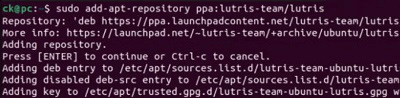
Step 2: Now, as the Repository is Configured, the Lutris is ready to be installed. Before the Installation of Lutris, the following command will be used for updating.
Command: sudo apt update
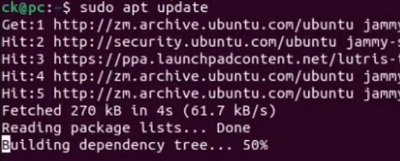
Step 3: Now, at last, use the following command. This command will take some time to complete the process as it will first download Lutris & later, it will go for the installation process.
Command: sudo apt install lutris
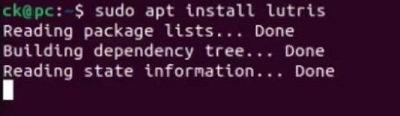
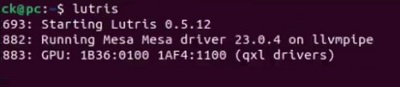
Step 4: Now, as the Lutris is installed, use the following command. If the command is executing, then be assured that the Lutris is Installed successfully.
Command: lutris
Conclusion
In the end, we can say the process to Download & Install Lutris on Linux is not a difficult & complex process. You just have to execute a Bunch of Linux Commands and else will be completed automatically. However, before moving for Lutris Installation on Linux, you have to Configure Wine of Linux Distributions beforehand.
 Download and Install Lutris on Linux
Explore
How To
MAC
AI Tools
Shortcut Key