What is a web server - Working and Architecture
Last Updated :
06 Dec, 2025
A web server is a software or hardware system that stores, processes, and delivers web content to users over the internet. It is a core component of the client–server model, handling requests from browsers and returning the required resources.
- Web servers use the HTTP protocol to manage communication on the web.
- A browser sends an HTTP request to the server when you enter a website’s URL.
- The server responds by delivering the requested web page for the browser to display.
Web Server Architecture
Web server architecture refers to the structure and design of web servers, outlining how they handle incoming requests and deliver web content. There are two main approaches to web server architecture:
1. Single-Tier (Single Server) Architecture:
In a single-tier architecture, a single server is responsible for both processing requests and serving web content. This is suitable for small websites or applications with low traffic. However, it has limitations in terms of scalability and fault tolerance. If the server goes down, the entire service becomes unavailable.
 2. Multi-Tier (Load-Balanced) Architecture:
In a multi-tier architecture, multiple servers are used to distribute the workload and ensure high availability. This approach often involves load balancers that evenly distribute incoming requests across a cluster of web servers. Each server can serve web content independently, and if one server fails, the load balancer redirects traffic to healthy servers, ensuring uninterrupted service.
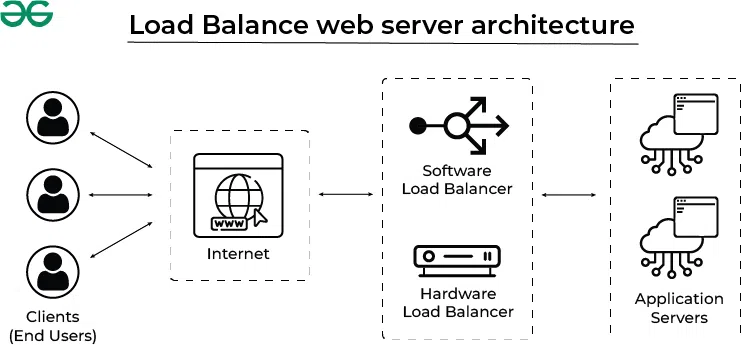
Working of Web Servers
A web server works in the following ways:
- Obtain the IP address from domain name: IP address is obtained in two ways either by search it in the cache or requesting DNS Servers
- Requests full URL from Browsers: After fetching IP address a full URL is demanded from from web server
- Web Server Responds to the request: In accordance with the request a response is sent by the server in case of successful request otherwise appropriate error message is sent
- The Web Page is displayed on the browser: After getting the response from the server, the web browser displays the result

Types of Web Servers Software's:
There are several types of web servers, each designed for specific purposes:
- Apache HTTP Server: Apache is one of the most popular open-source web servers globally, known for its flexibility and robustness. It's highly customizable and supports a wide range of modules and extensions.
- Nginx: Nginx is another widely used web server known for its speed and efficiency in handling concurrent connections.
- Microsoft Internet Information Services (IIS): IIS is a web server developed by Microsoft for Windows servers. It's commonly used for hosting websites and web applications built on Microsoft technologies like ASP.NET.
- LiteSpeed: LiteSpeed is a commercial web server known for its high performance and security features. It's often used in hosting environments where speed and security are paramount.
Built-In Web Server Capabilities
Web servers offer a range of features, including:
- Content Hosting: They store and serve web content, including HTML pages, images, videos, and other multimedia files.
- Security: Web servers implement various security mechanisms to protect against unauthorized access and cyberattacks.
- Load Balancing: Some web servers can distribute incoming traffic across multiple server instances to ensure optimal performance and availability.
- Logging and Monitoring: They provide tools to track and analyze server performance, user access, and error logs.
- Caching: Web servers can cache frequently accessed content to reduce server load and improve response times.
Benefits of Web Servers
Using web servers offers several advantages, including:
- Scalability: Web servers can handle a large number of simultaneous connections, making them suitable for high-traffic websites.
- Reliability: They are designed for continuous operation and can recover from failures gracefully.
- Security: Web servers include security features to protect against common web threats like DDoS attacks and SQL injection.
- Customization: Web server configurations can be tailored to specific application requirements.
Web Server Applications
Here, are some common applications of web server:
- Hosting Websites: The most common use of web servers is to host websites, making them accessible on the internet.
- Web Applications: Web servers provide the infrastructure for hosting web applications, enabling users to interact with software through a web interface.
- File Sharing: Some web servers are used for file sharing and collaboration, allowing users to upload and download files securely.
- Content Delivery: Content delivery networks (CDNs) use web servers to distribute content like images and videos to users worldwide, reducing load times.
- API Hosting: Web servers are used to host APIs (Application Programming Interfaces) that allow applications to communicate and exchange data over the internet.
Situations Requiring Web Servers
You should consider using a web server when:
- Hosting a Website: If you want to make your website accessible on the internet, you'll need a web server to store and serve your web pages.
- Building Web Applications: Web servers can host web applications, providing the necessary infrastructure for users to access and interact with your software.
- Load Balancing: When you anticipate high traffic or want to ensure fault tolerance, using a web server as a load balancer can distribute requests evenly across multiple servers.
Steps to Use Web Server
- Step 1: Choose a Web Server Software
Select a web server software that suits your needs. Apache, Nginx, and LiteSpeed are popular choices, depending on your requirements. - Step 2: Install and Configure
Install the chosen web server software on your server or hosting environment. Configure it by specifying settings such as document root, security rules, and virtual hosts. - Step 3: Upload Your Website
Upload your website files to the server. These typically include HTML, CSS, JavaScript, and any other assets like images or videos. - Step 4: Test Your Website
Test your website by accessing it through a web browser. Ensure that it loads correctly and all functionalities work as expected. - Step 5: Monitor and Maintain
Regularly monitor your web server for performance, security, and updates. Implement security measures to protect against threats.
Also Check:
Working of Web Server
What is the primary function of a web server?
-
To store and process data for applications
-
To deliver web content to users over the Internet
-
To manage user authentication and authorization
-
To run database management systems
In a single-tier web server architecture, how is processing handled?
-
Multiple servers divide processing tasks
-
A single server handles all tasks alone
-
Only a database server manages content
-
The browser distributes logic automatically
Explanation:
Single-tier architecture relies on one server for both processing and content delivery, suitable for small sites.
What is the main function of a load balancer in multi-tier architecture?
-
To create website animations for users
-
To replace database servers when required
-
To edit source code before deployment
-
To distribute traffic across multiple servers
Explanation:
A load balancer ensures high availability by evenly distributing incoming requests across several servers.
Which web server software is known for high performance with concurrent connections?
-
Apache HTTP Server platform
-
-
-
Microsoft IIS for Windows
Explanation:
Nginx is optimized for efficient handling of many simultaneous connections.
For which scenario is a web server typically required?
-
Editing graphics in design tools
-
Hosting websites or applications
-
Running mobile games offline
-
Managing local desktop programs
Explanation:
Any public website or online web application needs a web server to receive and respond to HTTP requests
Quiz Completed Successfully
Your Score : 2/5
Accuracy : 0%
Login to View Explanation
1/5
1/5
< Previous
Next >
Explore
AI for Coding
AI for Image and Video
Research Using AI
MS Office Suite
Operating Systems & Tools
Management Tools