Fragmentation in Operating System
Last Updated :
08 Jan, 2026
Fragmentation in computing is the process in which a file, such as a data file or an executable program, is divided into smaller fragments that are stored in different parts of a storage medium, such as a hard disk or RAM. When a file is fragmented, its fragments are stored in non-contiguous blocks, meaning they are not placed next to each other. This can lead to inefficient use of memory or storage and slower access to files. Fragmentation occurs both in memory (RAM) and storage, and it is a common challenge in operating systems that affects overall system performance.
- Fragmentation occurs when processes repeatedly load and unload from memory, leaving small blocks of memory unused.
- Programs create free spaces or "holes" in memory when they are loaded and removed, which cannot always be used by new processes.
- The memory allocation scheme of the operating system determines how and when fragmentation occurs.
- Fragmented memory or storage becomes inefficient, as the scattered blocks cannot be easily assigned to incoming processes.
- Accessing fragmented files can slow down the system because the OS has to locate and assemble the scattered fragments.
- Defragmentation is the process of reorganizing memory or storage to store files in contiguous blocks, improving efficiency and access speed.
Cause of Fragmentation
- Fragmentation occurs when a file is too large to fit into a single contiguous block of free space on the storage medium.
- It can also happen when the available free blocks on the storage medium are too small to hold the entire file.
- As a result, the file is split into fragments that are stored in different locations.
- The system must search for and retrieve these scattered fragments to access the file, which can slow down file reading and processing.
Effect of Fragmentation
- Fragmentation reduces overall system performance because accessing scattered fragments takes more time.
- It makes files harder to read or access efficiently.
- Regular defragmentation helps reorganize the scattered data blocks so that files are stored in contiguous blocks.
- Defragmenting improves access speed, memory or storage efficiency, and overall system performance.
Types of Fragmentation
In an operating system, fragmentation mainly occurs in two different forms based on how memory or storage space is utilized. These types explain where and how unused space is created during memory or storage allocation. The two main types of fragmentation are:
- Internal Fragmentation
- External Fragmentation
1. Internal Fragmentation
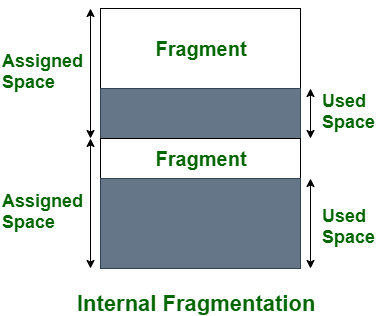
- Internal fragmentation occurs when allocated memory contains unused space within a block.
- It happens when the size of the allocated memory block is larger than the actual memory required by a process.
- For example, if a system allocates a 64 KB memory block to a process that requires only 40 KB, the remaining 24 KB remains unused, resulting in internal fragmentation.
- This type of fragmentation commonly occurs in systems that use fixed-size memory allocation techniques.
- The unused space inside the allocated block cannot be utilized by other processes, leading to inefficient memory usage.
2. External Fragmentation
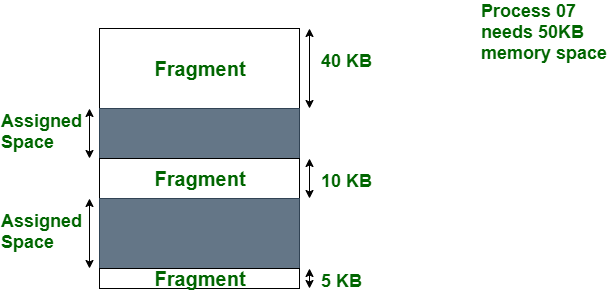
- External fragmentation occurs when free memory or storage space is divided into many small, non-contiguous blocks.
- It is caused by frequent allocation and deallocation of processes or files over time.
- Even if the total free space is sufficient, the system may be unable to allocate memory because no single contiguous block is large enough.
- As a result, files or processes must be stored in multiple smaller blocks, increasing access time.
- External fragmentation leads to performance degradation and inefficient use of storage or memory resources.
Fragmentation can also occur at various levels within a system. File fragmentation, for example, can occur at the file system level, in which a file is divided into multiple non-contiguous blocks and stored on a storage medium. Memory fragmentation can occur at the memory management level, where the system allocates and deallocated memory blocks dynamically. Network fragmentation occurs when a packet of data is divided into smaller fragments for transmission over a network.
- Fragmentation significantly affects the overall performance and stability of an operating system.
- It slows down disk read and write operations because the disk head must move to multiple locations to access scattered file fragments.
- Increased disk head movement raises access time, which reduces system speed and causes application slowdowns and lag.
- Fragmentation leads to inefficient disk space utilization, as fragmented files may occupy more space than necessary.
- Wasted disk space can result in storage shortages, making the system unstable and more prone to errors or crashes.
- In severe cases, excessive fragmentation can cause the system to run out of disk space, increasing the risk of data loss.
- A highly fragmented disk increases the likelihood of system crashes and operational errors.
- Fragmentation can negatively impact battery life in laptops and mobile devices because the disk has to work harder to access scattered data.
- Regular defragmentation reorganizes fragmented files into contiguous blocks, improving disk access speed and reducing latency.
- Maintaining low fragmentation ensures efficient resource usage, stable system operation, and a smooth user experience.
Advantages
- Fragmentation allows better utilization of available storage space on a hard disk or other storage media. Files can be stored in free blocks even if those blocks are not contiguous, preventing small unused spaces from being wasted.
- It enables the system to efficiently use scattered free space, which is especially helpful when the storage medium contains many small free blocks.
- Fragmentation makes it possible to store large files even when a single contiguous block of free space is not available. The file can be divided and stored across multiple smaller blocks.
- It provides flexibility in memory and storage allocation, allowing the operating system to continue functioning without requiring large continuous memory regions.
- Although fragmentation has these advantages, it is generally recommended to minimize it because excessive fragmentation can reduce system performance and make file access and management more complex.
Disadvantages
- Fragmentation can significantly degrade system performance, especially during file reading or access operations. The system must locate and retrieve multiple fragments from different locations, which takes more time than accessing a single contiguous file.
- It makes file management and organization more complex, as fragmented files are stored in multiple non-contiguous blocks, making them harder to track and access efficiently.
- Fragmentation can reduce the lifespan of storage devices such as hard disks and solid-state drives. Frequent access to scattered data increases read/write operations, leading to additional wear and tear on the storage medium.
- It consumes extra storage space because the system needs to maintain additional metadata to track the locations of each fragment. This reduces the amount of available space for storing other files.
Explore
OS Basics
Process Management
Memory Management
I/O Management
Important Links