
Import
Bring your board with you
Move a board from Trello, Jira, Asana or any spreadsheet into craaft. Upload the export, check what comes across, and land on a new board with your columns and cards in place.
How it works
4 steps, and nothing is made until the last one
-
Step 1
Choose the source
Pick Trello, Jira, Asana, CSV or craaft. Or drop the file in and craaft works out which it is.
-
Step 2
Upload the file
One export, up to 5 MiB.
-
Step 3
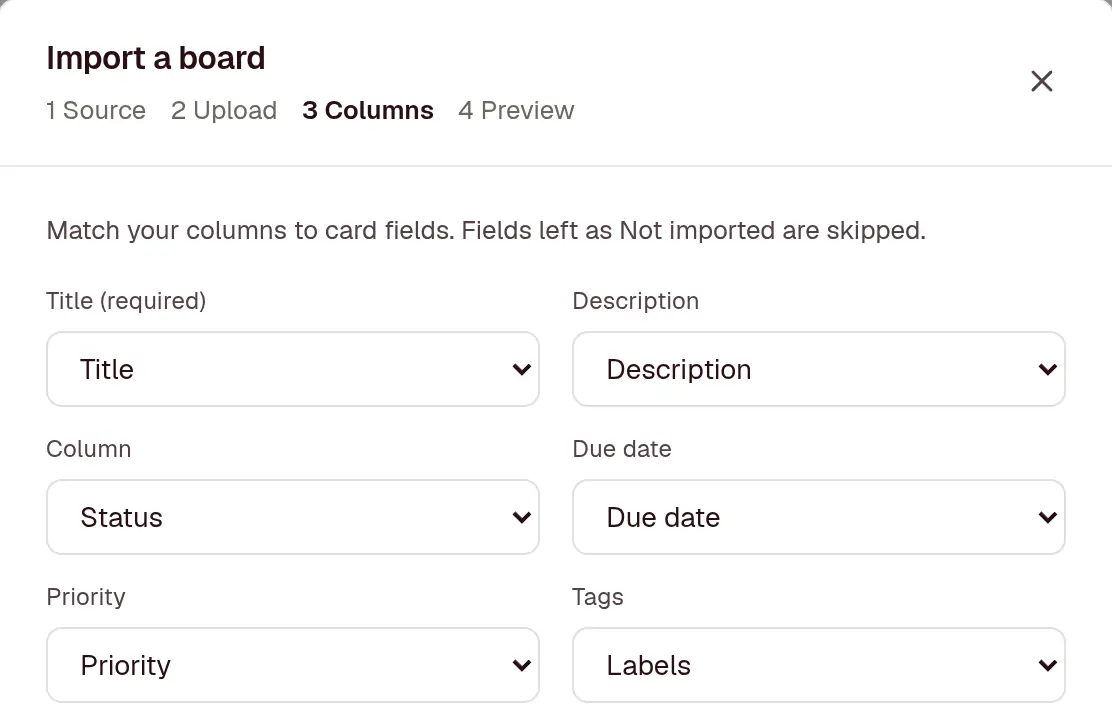
Match the columns
For a CSV, craaft matches your headers to card fields and shows the first 3 rows. Change any match, or leave a field out.
-
Step 4
Check the preview, then import
See the board’s name, its columns with their card counts, and who gets access. Nothing exists until you press Import.
import_board("office-move.csv")From Trello
In Trello, open the board menu, then Print, export and share, then Export as JSON.
- Lists become columns, in the same order
- Cards keep their description and due date, labels become tags, and members become assignees
- Checklists and comments come across
- Archived cards stay archived
Trello’s export keeps only the latest 1,000 actions, so on a busy board the oldest comments aren’t in the file. Attachments stay in Trello. Moving from Trello has the full detail.
From Jira
In Jira, search for the issues, then Export, then Export CSV (all fields).
- Summary becomes the title, and Description the description
- Each Status becomes a column
- Due date, Priority, Labels and Assignee map across
craaft spots a Jira export by its Summary, Issue key and Status columns, and fills in the matches for you. Moving from Jira has the full detail.
From Asana
In Asana, open the project menu, then Export, then CSV.
- Name becomes the title, and Notes the description
- Each Section/Column becomes a column
- Due Date, Tags and Assignee Email map across
- Completed tasks come in archived
Moving from Asana has the full detail.
From a spreadsheet
Any spreadsheet saved as CSV (UTF-8), with a header row and one row per card.
- Match any header to the title, description, column, due date, priority, tags, assignee or archived
- Common headers like Status, Due and Labels are matched for you
- Dates can be 2026-10-20, 20/10/2026 or 10/20/2026: craaft works out the order for each file
From another craaft board
In a craaft board, open Settings, then Import / export, then Export JSON.
- Columns keep their colours, WIP limits and which ones count as done
- Cards keep their checklists and comments
- Useful for copying a board into another workspace
What every import does
- Makes a new board, and changes nothing that already exists
- Takes up to 2,000 cards and 200 columns from one file
- Matches assignees to people in your workspace by email, username or name, and gives them access to the new board
- Sends no emails or notifications while it runs
- Works on every plan. The new board counts towards the 3 projects on Free
Bring one board over and see
Free for 3 projects, with no credit card to enter. Every board exports again as JSON or CSV whenever you want to leave.