


Command-line tool to customize Spotify client. Supports Windows, MacOS and Linux.
- Features
- Install
- Basic Usage
- Customization
- Default Extensions:
- Default Custom apps:
- Development
- Change colors whole UI
- Inject CSS for advanced customization
- Inject Extensions (Javascript script) to extend functionalities, manipulate UI and control player.
- Inject Custom apps
- Enable additional, hidden features
- Remove bloated components to improve performance


brew install khanhas/tap/spicetify-cliyay spicetify-cliOpen Powershell, run:
iwr https://raw.githubusercontent.com/khanhas/spicetify-cli/master/install.ps1 | iex- Download
linuxordarwinpackage from: https://github.com/khanhas/spicetify-cli/releases - In terminal, run following commands:
mkdir ~/spicetify
tar xzf ~/Downloads/spicetify-x.x.x-linux-amd64.tar.gz -C ~/spicetify
with ~/Downloads/spicetify-xxx.tar.gz is direct path to just downloaded package.
Optionally, run:
sudo ln -s ~/spicetify/spicetify /usr/bin/spicetifyNow you can run spicetify everywhere.
Before applying Spicetify, you need to gain write permission on Spotify files, by running command:
sudo chmod 777 /usr/share/spotify -RApps installed from Snap cannot be modified so you need to follow these steps to get Spicetify working:
- Uninstall Spotify in Snap or run command
snap remove spotify - Remove .spicetify folder:
rm -r ~/.spicetify - Open http://repository.spotify.com/pool/non-free/s/spotify-client/
You can see there are 2 deb files, for i386 and amd64. You should pick amd64 if your Ubuntu is 64bit version because seems like they stopped upgrading the client for i386. - Install deb file you just downloaded with Ubuntu Software. Might take a bit.
- After Spotify's installed successfully, you need to gain write permission on Spotify files, by running command:
sudo chmod 777 /usr/share/spotify -RRun with no command once to generate config file
spicetifyMake sure config file is created successfully and there is no error, then run:
spicetify backup apply enable-devtoolFrom now, after changing colors in color.ini or CSS in user.css, you just need to run:
spicetify updateto update your theme.
In Spotify, hit Ctrl Shift R / Command Shift R to reload and receive visual update of your theme.
For other commands and additional flags information, please run:
spicetify --helpConfig file is located at:
Windows: %userprofile%\.spicetify\config.ini
Linux: ~/.spicetify/config.ini
MacOS: ~/spicetify_data/config.ini
For detail information of each config field, please run:
spicetify --help configThere are 2 places you can put your themes:
Themesfolder in Home directory
Windows: %userprofile%\.spicetify\Themes\
Linux: ~/.spicetify/Themes/
MacOS: ~/spicetify_data/Themes
Themesfolder in Spicetify executable directory
If there are 2 themes having same name, theme in Home directory is prioritized.
Every theme should contain:
color.ini: store colors value that later will be converted to CSS variablesuser.css: set of custom CSS rules to manipulate, hide, move UI elements.
Basically are Javascript files that will be evaluated along with Spotify main javascript.
Add your desired extension filenames in config, separated them by | character.
Example:
[AdditionalOptions]
...
extensions = autoSkipExplicit.js|queueAll.js|djMode.js|shuffle+.js|trashbin.js
Extension files can be store in:
Extensionsfolder in Home directory:
Windows:%userprofile%\.spicetify\Extensions\
Linux:~/.spicetify/Extensions/
MacOS:~/spicetify_data/ExtensionsExtensionsfolder in Spicetify executable directory.
If there are 2 extensions having same name, extension in Home directory is prioritized.
Some Spotify API are leaked and put in global object Spicetify. Check out global.d.ts for API documentation.
Below are list of default extensions that comes with package:
Filename: autoSkipVideo.js
Videos are unable to play in some regions because of Spotify's policy. Instead of jumping to next song in playlist, it just stops playing. And it's kinda annoying to open up the client to manually click next every times it happens. Use this extension to skip them automatically.
Filename: autoSkipExplicit.js
Auto skip explicit tracks

Filename: djMode.js
Easily setting up the client for your friends or audiences to choose, add song to queue but prevent them to control player. Plays button in album track list/playlist are re-purposed to add track to queue, instead of play track directly. Hide Controls option also allow you to hide all control button in player bar, Play/More/Follow buttons in cards.

Filename: keyboardShortcut.js
Register some useful keybinds to support keyboard-driven navigation in Spotify client. Less time touching the mouse.
- Ctrl Tab / Ctrl Shift Tab: Navigate items in left sidebar menu.
- Backspace/Shift Backspace: Navigate history backward/forward.
- PageUp/PageDown: Force scroll up/down app page only (because mouse focus is sometimes in sidebar region and they scroll sidebar instead of app page).
- J/K: Scroll app page up/down. *Tips hat to Vim users*
- Ctrl Q: Open Queue page.
- `: Open up keyboard-driven navigation. Hit correct key sequences to open up place you want to go:

Filename: queueAll.js
You like using Discover, New Releases page to find new music but adding each one of them to queue takes a lot of effort? If so, activate this extensions and apply. At top of every carousel now has a "Queue All" button to help you add all of them to queue. Note: Not available for playlist carousels. Just songs, albums ones.

Filename: shuffle+.js
Detect current context (playlist, album, user collection or show), gather all its items and shuffle them with Fisher–Yates algorithm.
After injecting this extension, go to Queue and you can find 2 new buttons at page header:
- Shuffle Context: detect current context and shuffle all its item.
- Shuffle Queue: shuffle only 80 items or less that are visible in Queue page. It's only useful for mixed context queue.
For most of the time, just use Shuffle Context.


Filename: trashbin.js
Throw songs/artists to trash bin and never hear them again (automatically skip). This extension will append a trash bin button in player bar and one in every artist page header. Button in player bar will immediately skip and add that song to trash list. Button in artist page will add that artist in trash list and skip whenever his/her songs play.
 |
 |
|---|
Inject custom apps to Spotify and access them in left sidebar.
Add your desired custom app folder names in config, separated them by | character.
Example:
[AdditionalOptions]
...
custom_apps = reddit|yourownapp
App folders can be store in:
CustomAppsfolder in Home directory:
Windows:%userprofile%\.spicetify\CustomApps\
Linux:~/.spicetify/CustomApps/
MacOS:~/spicetify_data/CustomAppsCustomAppsfolder in Spicetify executable directory.
If there are 2 apps having same name, app in Home directory is prioritized.
I included my own app to demonstrate how to make and inject an app:
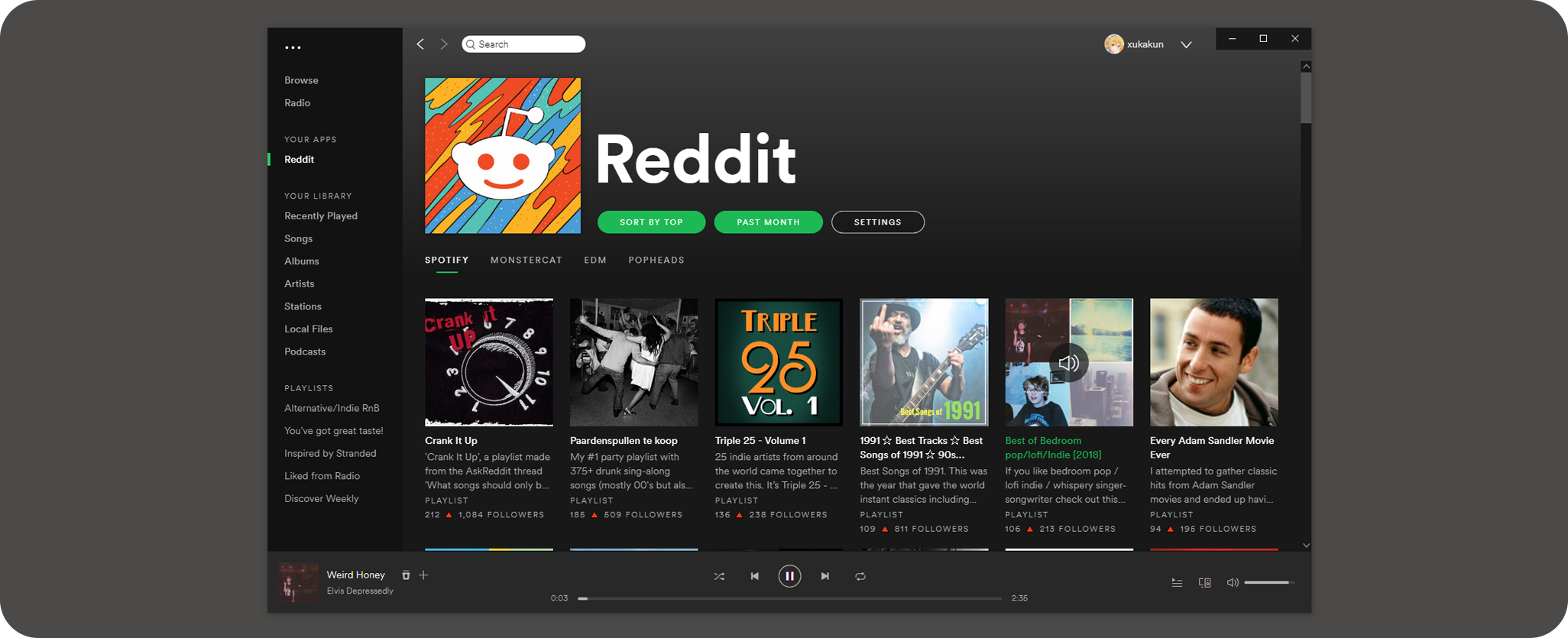
Fetching top 100 Spotify posts in any subreddit. This app has native feels and behavior just like other Spotify apps: you can follow, save, play, open playlist/track/album directly. Moreover, it also can fetch Youtube posts and play them inside Spotify.
Clone repo and download dependencies:
cd $HOME
git clone https://github.com/khanhas/spicetify-clicd $HOME\spicetify-cli
go build -o spicetify.execd ~/spicetify-cli
go build -o spicetify- SASS