

Authentication and Authorization are key security steps that ensure only the right users access a system and can perform permitted actions. Authentication verifies who you are, and Authorization determines what you can do.
- Authentication: Confirms the user’s identity.
- Authorization: Determines what the verified user is allowed to access or perform.
Working of Authentication and Authorization
This explains how users are first verified and then given the appropriate access:

Authentication
Authentication is the process of verifying the identity of a user or system. It ensures that the user is legitimate by validating credentials like passwords, OTPs, or biometrics.
Working
The authentication process verifies the identity of a user before granting access to the system.
- User enters credentials (password, OTP, biometrics)
- System verifies the credentials
- If valid, the user is successfully authenticated
Authorization
Authorization determines the access rights and permissions of an authenticated user. It decides what resources the user can access and what actions they are allowed to perform.
Working
The system uses authentication and authorization processes to control access and ensure security.
- System checks the user’s roles or permissions
- Grants or denies access to resources
- Ensures the user can perform only allowed actions
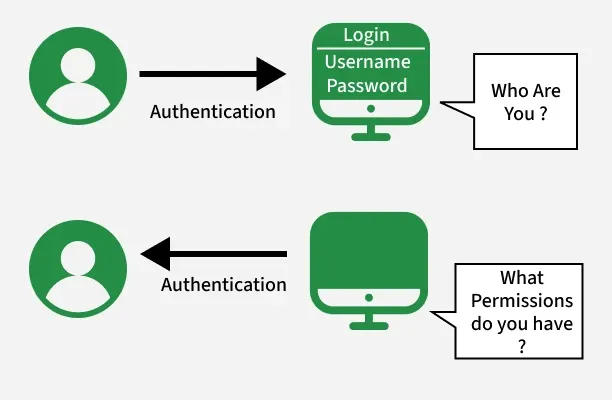
Difference Between Authentication and Authorization
Here are some main differences between Authentication and Authorization:
| Authentication | Authorization |
|---|---|
| Verifies who the user is | Determines what the user can access |
| Performed before authorization | Happens after authentication |
| Requires login details (username, password, biometrics) | Requires user roles, privileges, or access levels |
| Determines if the user is valid | Determines what permissions the valid user has |
| Uses ID Tokens | Uses Access Tokens |
| Governed by OpenID Connect (OIDC) | Governed by OAuth 2.0 |
| Credentials can be changed by the user | Permissions can only be changed by the system owner |
| Visible to the user (entering credentials) | Not visible to the user (handled in the background) |
| Examples: Password, OTP, fingerprint, face recognition | Examples: Admin rights, read/write access, role-based permissions |