

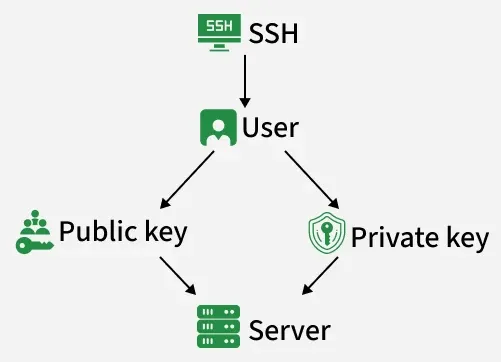
SSH keys allow users to authenticate securely with remote servers. They replace the need for passwords by using keys. SSH keys always come in key pairs, consisting of:
- Public key - Everyone can see it, no need to protect it (for encryption function).
- Private key - Stays in the computer, must be protected (for decryption function).
Techniques Used in SSH
1. Symmetric Cryptography
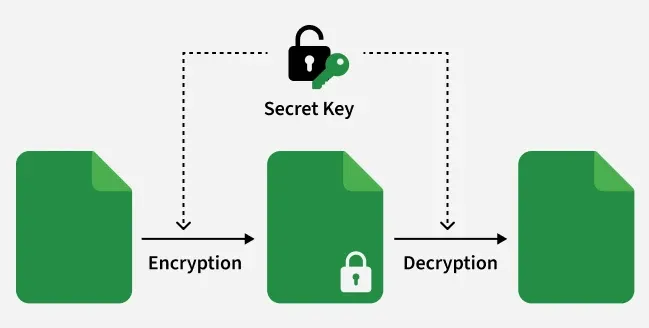
Same secret key is used for both encrypting and decrypting data. In SSH, this technique is mainly used after the connection is established.
- Requires a single shared secret key between sender and receiver.
- Very fast and efficient for encrypting large amounts of data.
- Common algorithms include AES and DES.
2. Asymmetric Cryptography
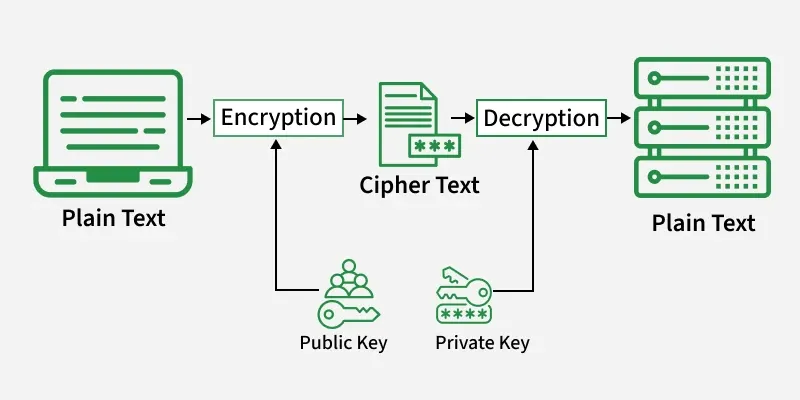
SSH uses this technique to authenticate users and securely exchange keys without exposing sensitive information.
- Public key is shared openly, while the private key remains secret.
- Used mainly for user authentication and key exchange.
- Common algorithms include RSA and DSA.
3. Hashing
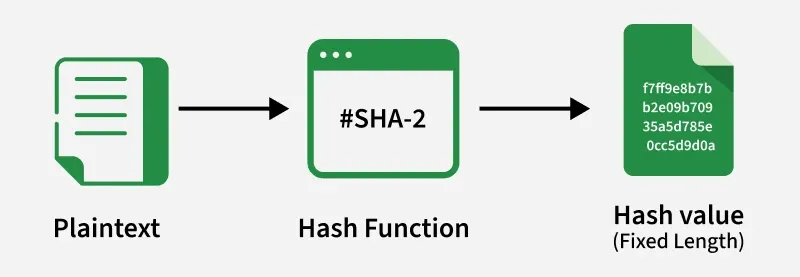
It is a cryptographic process that converts input data of any size into a fixed-length value called a hash.
- Produces a unique hash value for given input data.
- Even a small change in data results in a completely different hash.
- Helps detect tampering during communication.
Components of SSH Keys
1. Public Key
A public key is the part of an SSH key pair stored on the server to authorize a user’s access. It works with the private key to verify the client’s identity, enabling secure, password less authentication.
- Stored in the server’s
~/.ssh/authorized_keysfile. - Cannot decrypt data or log in by itself, ensuring security even if exposed.
- Used during authentication to validate the client without transmitting sensitive information.
2. Private Key
A private key is kept securely on the client device and is used to prove the user’s identity to the server. It must remain secret, as possession of the private key allows access to servers authorized for that key.
- Generates cryptographic signatures during authentication.
- Never transmitted over the network to maintain security.
- Provides the “unlocking” capability for the server’s public key “lock.”
Key Pair Relationship
The public and private keys are mathematically linked, forming a pair that enables secure authentication. The private key signs authentication challenges, which the server verifies with the public key to allow access.
- Ensures the private key never leaves the client device.
- Enables password less login while maintaining strong security.
- Forms the basis for asymmetric encryption used in SSH.
Types of SSH Keys
1. User Authentication Keys
These are used to verify the identity of a user when connecting to a remote server using SSH.
- Enable password less login for users.
- Commonly used for remote server administration.
- Support automation and scripted access.
2. Host Keys
These keys are used by SSH servers to prove their identity to connecting clients. They help clients confirm that they are communicating with the correct server and not an impersonator.
- Verified by the client during the first connection.
- Stored locally on the client after initial trust.
- Trigger warnings if the server identity changes unexpectedly.
3. Session Keys
Session keys are temporary symmetric keys generated during an SSH connection to encrypt data exchanged between the client and server. They are created after authentication is completed.
- Provide fast and efficient data encryption.
- Automatically discarded when the session ends.
- Ensure confidentiality of transmitted data.
SSH Key Authentication Working
1. Client starts the connection: The user’s computer (client) tries to connect to a remote server using the SSH protocol.
2. Server checks authentication method: The server checks whether SSH key–based authentication is enabled and allowed for login.
3. Client sends its public key: The client sends its public key to the server. This key does not contain any secret information and is safe to share.
4. Server checks authorized keys: The server looks inside its authorized_keys file to see if the received public key is already registered.
- If the key is not found, access is denied.
- If the key is found, the process continues.
5. Server creates a challenge: To confirm the client’s identity, the server creates a random piece of data called a challenge and sends it to the client.
6. Client signs the challenge: The client uses its private key to sign the challenge
- The private key never leaves the client’s machine.
- Only the correct private key can create a valid signature.
7. Client sends signed response: The signed challenge is sent back to the server as proof that the client owns the private key.
8. Server verifies the signature: The server uses the stored public key to verify the signature
- If the signature matches, the client is authenticated.
- If it doesn’t match, access is denied.
9. Secure access is granted: Once verified, the server allows the client to log in securely without asking for a password.
Generating SSH Keys
Generating SSH keys is the process of creating a public and private key pair that is used for secure, password less authentication.
1. Key Generation Command
- SSH keys are generated using the
ssh-keygencommand. - Example command: ssh-keygen -t ed25519
- This command creates a new SSH key pair for authentication.
2. Recommended Key Type
- ed25519 is the recommended key type.
- It is more secure, faster, and uses smaller key sizes compared to older RSA keys.
- Suitable for modern systems and best security practices.
3. Key Storage Location
- By default, SSH keys are stored in the
~/.ssh/directory. - Common files include,
id_ed25519private key andid_ed25519.pubpublic key - The private key should never be shared.
4. Installing Public Key on Server:
- The public key must be copied to the server to allow access.
- Example command: ssh-copy-id user@server_ip
- This adds the public key to the server’s
authorized_keysfile.
Advantages
- Users can log in securely without entering passwords every time.
- SSH keys cannot be stolen through fake login pages like passwords.
- Ideal for automated scripts, system maintenance, and DevOps workflows.
- Login process is quicker compared to password-based authentication.
- Keys can be easily added, removed, or restricted without changing user passwords.