Create technical diagrams to clarify complexity
Visualize the details of your work. Use Lucidchart to document complex processes by creating visuals that increase clarity and efficiency.


Build with data
Bring in data from outside sources to build diagrams, and gain insights by putting data into a visual context.
The perfect toolkit for technical diagramming

Create robust entity relationship diagrams
Visualize database structures with ER diagrams. Streamline collaboration, design with ease, and empower your engineering team to better see and understand entity relationships.

Customize your technical documentation
Use pre-made shape libraries or import your own shapes to create custom libraries you can share with collaborators. Leverage intelligent styles and developer tools for greater precision.

Standardize documentation across teams
Embed diagrams into integrated apps such as Jira, Confluence, Notion, and more. Make Lucidchart your hub for standardized documentation with secure sharing and access tracking.
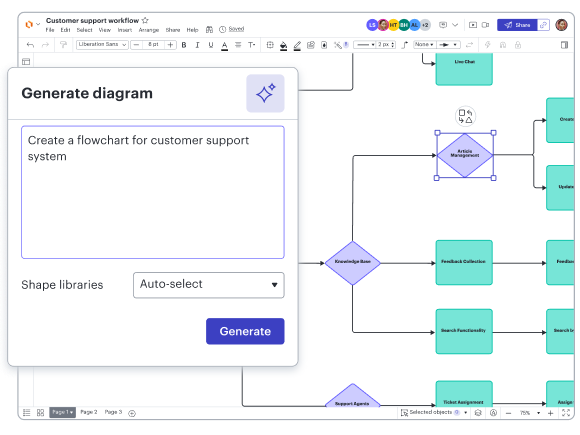
Create AI-powered flowcharts
Use Lucid AI in Lucidchart to effortlessly transform your text-based prompts into flowcharts. Increase visual clarity and refine your workflows while saving time in the process.
Learn more about AI in LucidchartFeatures for visualizing systems and structures

Custom templates
Create predefined templates to increase alignment, consistency, and scalability across projects.

Shape libraries
Use existing shape libraries for Salesforce, enterprise architecture, and more—or customize your own.

Exports
Export diagrams in SQL or Quickbase formats for easy collaboration between design and development teams.

Imports
Import a database or Salesforce schema and visualize changes before implementing them.

Real-time editing
Streamline work by enabling multiple collaborators to create and edit the same diagram at once.

Conditional formatting
Transform data by visually highlighting patterns and insights for quick comprehension at a glance.
Integrations with leading apps
Streamline your team’s workflows by connecting Lucidchart with these featured apps—and many more.

Confluence
Enrich Confluence spaces and pages with Lucidchart documents to improve context, clarity, and collaboration.
Learn more
ServiceNow
Visualize your portfolio by generating Lucidchart diagrams from your ServiceNow APM data.
Learn more
Jira
Embed diagrams and other visual documentation in Jira tasks, projects, or issues to keep everyone aligned.
Learn moreAdditional resources
Intelligent Diagramming badge
Learn how to create dynamic, data-backed diagrams to visualize anything.
Creating an innovation repository
Centralize your diagrams and documents to boost innovation.
Lucidchart diagram center
Explore a wide range of diagrams and step-by-step tutorial guides.