


Overview
Taskade AI powers everything from app building and content generation to AI agents, automations, and file analysis. This article explains how AI credits work and what each plan includes.
TL;DR: Every Taskade plan ships monthly AI credits that fuel app building, chat, agents, automations, image generation, and file analysis. Credits burn only while you iterate, never when visitors use a published Taskade Genesis app. Pick lighter AI Models to stretch them further.
Key insight: Published apps run free — once you publish, visitors can use the app all they want and it doesn't cost you credits. Credits are consumed only during iteration (you building or editing in the Taskade Genesis editor, chatting with agents, running AI automations).
Note: Check out our latest plans at taskade.com/pricing
AI Credit Tiers
Every Taskade plan includes monthly AI credits that power all AI features. Credits reset on the 1st of each month at 00:00 UTC.
| Plan | Credits/Month | ~Apps |
|---|---|---|
| Free | Up to 3,000 (one-time) | ~1 app |
| Starter ($6/mo) | Monthly refill | ~10 apps |
| Pro ($16/mo) | Higher monthly refill | ~50 apps |
| Business ($40/mo) | Largest monthly refill | ~150 apps |
| Max ($200/mo) | Maximum credit capacity | ~500 apps |
| Enterprise ($400/mo) | Custom | Custom |
How Are Credits Consumed?
Credits are consumed each time the AI thinks or takes a step. The cost depends on the model selected and the type of action. More complex tasks and more powerful models use more credits.
Note: Check the model selector dropdown tooltip to see the credit cost for each model.
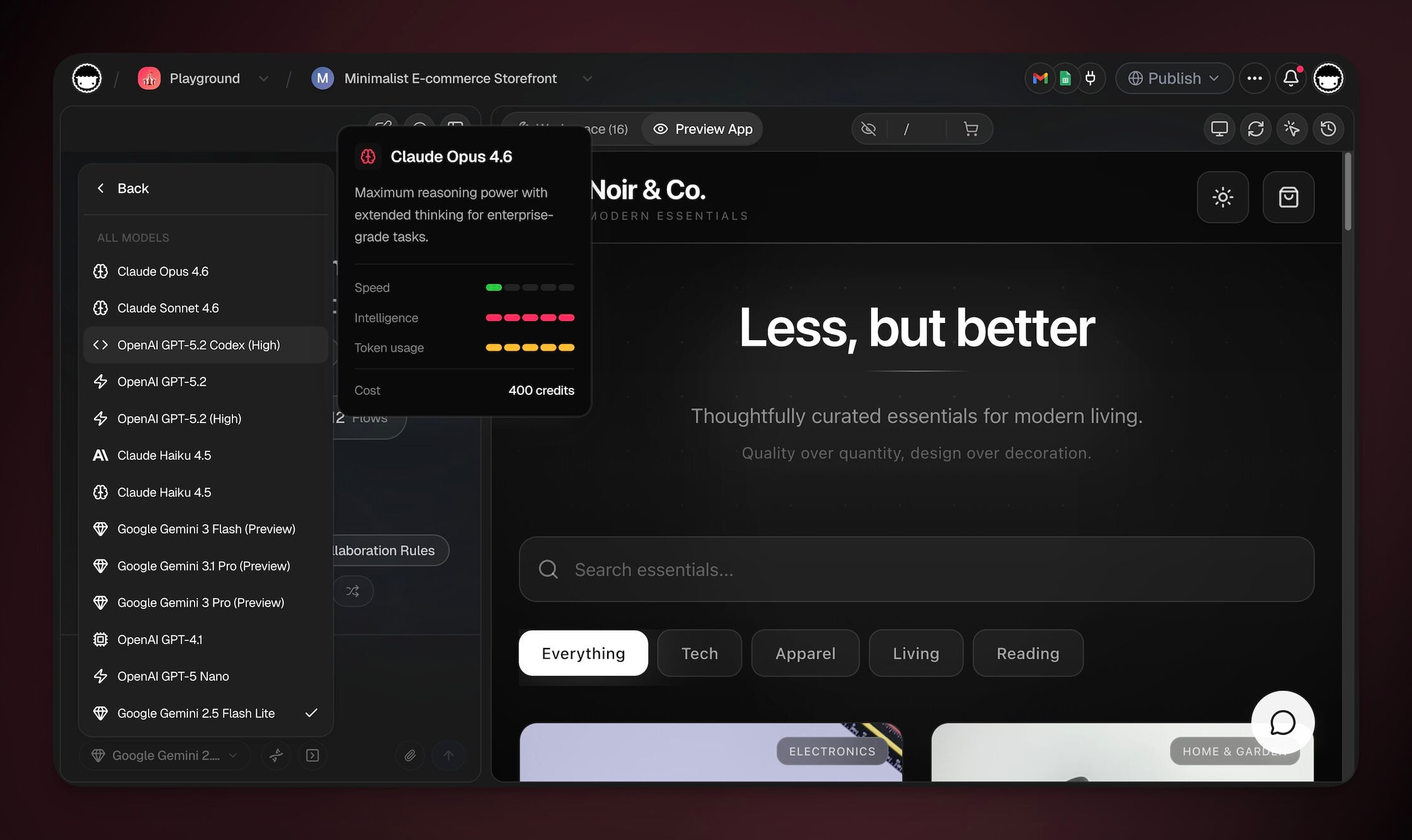
| Action | Notes |
|---|---|
| Building and editing apps | Varies by model |
| AI chat message | Varies by model (each reasoning step) |
| Agent tool call | Each integration call |
| MCP tool call | Each Model Context Protocol action |
| Image generation | Higher cost than text actions |
| Web search | Each search performed by an agent |
| Automation AI step | Only AI-powered steps count |
| File analysis | Per file uploaded and processed |
| Multi-agent turn | Each agent uses credits independently |
Available AI Models
Taskade gives you access to 15+ frontier models from OpenAI, Anthropic, Google, and leading open-source providers. Different models have different credit costs. More powerful models use more credits per action. See AI Models for the full catalog and Model Credits for per-model cost details.
Note: Select your preferred model from the dropdown in any AI feature. The tooltip shows the credit cost per action.
Check Remaining AI Usage/Credits
You can monitor your workspace usage across projects, agents, automations, and storage on the Usage Page. Follow these steps to check your AI usage:
- Click your gear icon ⚙️ in the sidebar on the left.
- Choose the Usage & Billing tab from the sidebar on the left.

Credit Transparency: See Exactly What Used Your Credits
Every credit is accounted for. Open Settings → Usage & Billing and expand Detailed Usage Breakdown to see your account-level usage at a glance, so you are never guessing. Because credits are charged per step (each reasoning turn, each tool call), one complex agent run can use several credits.
- What the breakdown shows: AI credits used this month against your limit, plus Automation Runs, Workspaces, and Storage. These are account-level totals across all your workspaces, each with a progress bar.
- Monthly reset: your AI credits reset on the 1st of each month at 00:00 UTC. The same remaining-credit count appears in the credits panel at the top of your workspace, with a low-credit heads-up before you run out.
- Per-model cost up front: the model selector shows the credit cost next to each model before you run an action. Lighter models (Gemini Flash, Claude Haiku) cost fewer credits per step, so picking the right model is the easiest way to stretch your credits. See Model Credits.
- Published apps stay free: visitor activity on a published Taskade Genesis app never counts against your credits, so your usage reflects only your own building and AI runs.
Which features use AI?
Taskade AI is used with the following features:
Have questions? Check the Taskade Genesis FAQ for answers.
Related guides
- AI Models — The 15+ frontier models you can choose from
- Model Credits — Per-model credit costs
- Taskade Pricing — Full plan comparison
- Buy Extra Credits — Pay-as-you-go top-ups for Pro and above
- Usage Page — Monitor your current usage